INTRODUCTION
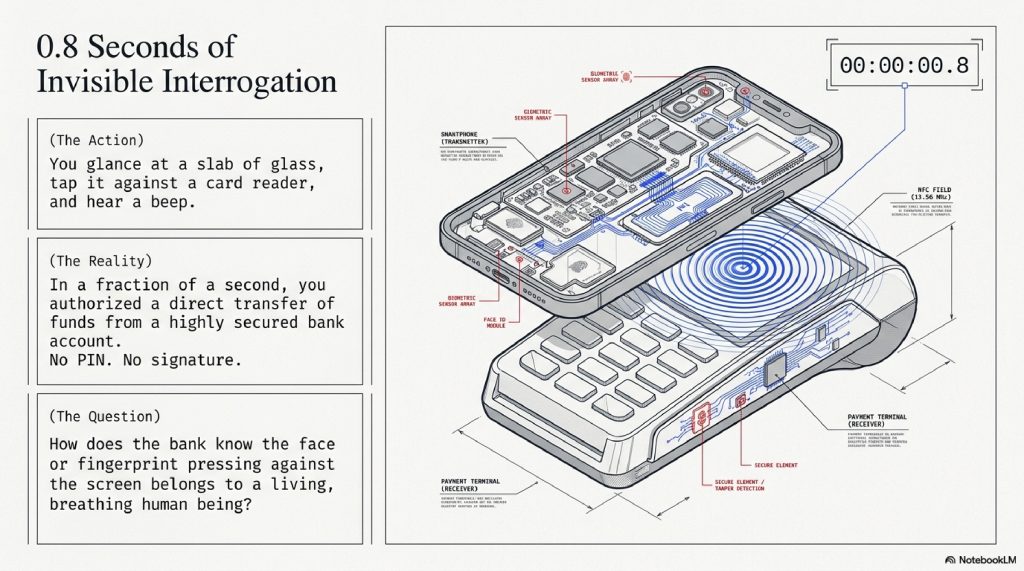
You are standing at a coffee shop counter. The barista hands you a latte and points to the card reader. You don’t reach for your wallet. Instead, you pull a small slab of glass from your pocket, glance at it for a fraction of a second, and tap it against the terminal.
Beep. Approved.
In that fleeting moment, you just authorized a direct transfer of funds from your highly secured bank account. You didn’t type a PIN. You didn’t answer a security question. You didn’t provide a signature. You simply looked at your device.
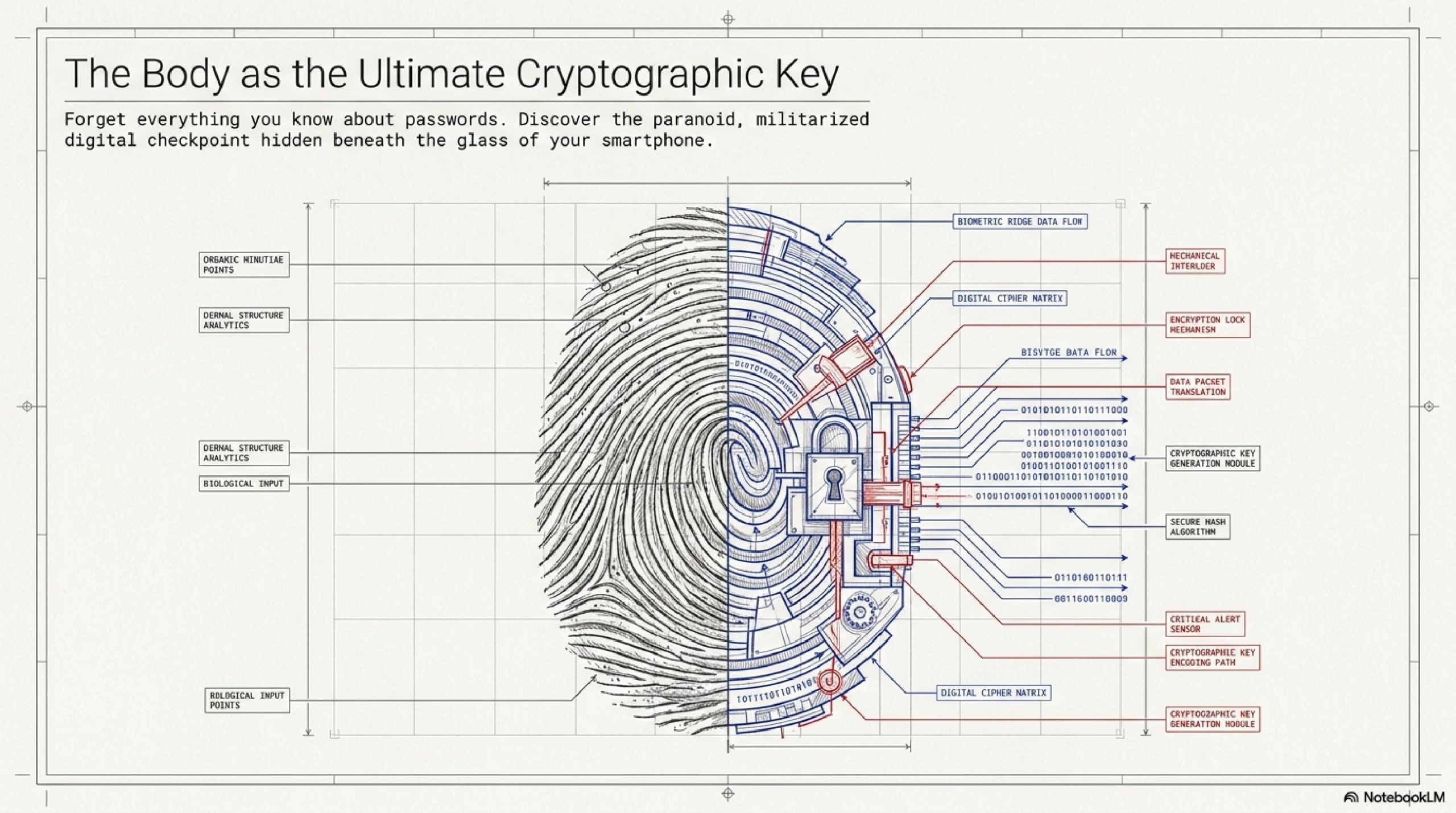
We perform this ritual dozens of times a day unlocking screens, opening banking apps, downloading software and we treat it with absolute nonchalance. It feels like magic. But beneath that glass screen is a paranoid, highly militarized digital checkpoint performing billions of calculations per second to answer one terrifyingly important question: Is this really you?
For decades, digital security was based on what you knew (a password) or what you had (a physical key). But passwords can be guessed, written on sticky notes, or stolen in massive corporate data breaches. Keys can be copied.
To solve this, engineers had to figure out how to lock our digital lives behind something that cannot be guessed, forgotten, or easily stolen: our biology.
But how does a machine actually “see” you? How does your bank know that the fingerprint pressing against the screen belongs to a living, breathing human being, and not a high-resolution photograph or a silicone mold? And most importantly, if your face is the password to your life savings, where is that “password” stored, and who has access to it?
In this deep dive, we are going to strip away the black glass of your smartphone. We will travel down into the microscopic valleys of your fingerprints, explore the invisible grid of lasers mapped across your face, and unlock the heavily armored microchip buried deep inside your device that even the manufacturer cannot access.
Forget everything you know about passwords. You are about to discover how your body became the ultimate cryptographic key.
TABLE OF CONTENTS
- The Simple Explanation: The Unforgeable Puzzle Piece
- Step-by-Step Breakdown: The Fraction of a Second
- Real-World Example: Paying the Barista
- The Advanced Technical Layer: How Your Phone Actually “Sees”
- The Secure Enclave: Why Hackers Can’t Steal Your Face
- Common Myths About Biometrics
- The Future: The Way You Walk and Type
- Surprising Facts You Didn’t Know
- FAQs
- Other Blog Suggestions
- Conclusion
A. THE SIMPLE EXPLANATION: The Unforgeable Puzzle Piece
To understand biometric authentication, imagine a highly exclusive vault.
In the old days, the guard at the vault door asked for a secret passphrase. If you knew the phrase, you got in. The problem? Anyone who overheard the phrase could also get in.
Biometrics fires the guard and replaces the vault door with a highly complex jigsaw puzzle missing exactly one piece.
When you buy a new phone and set up fingerprint or facial recognition, you are essentially carving that final puzzle piece. You press your thumb to the glass, or slowly roll your head in a circle. The phone studies the ridges of your skin or the contours of your cheekbones. But it doesn’t take a photograph of you.
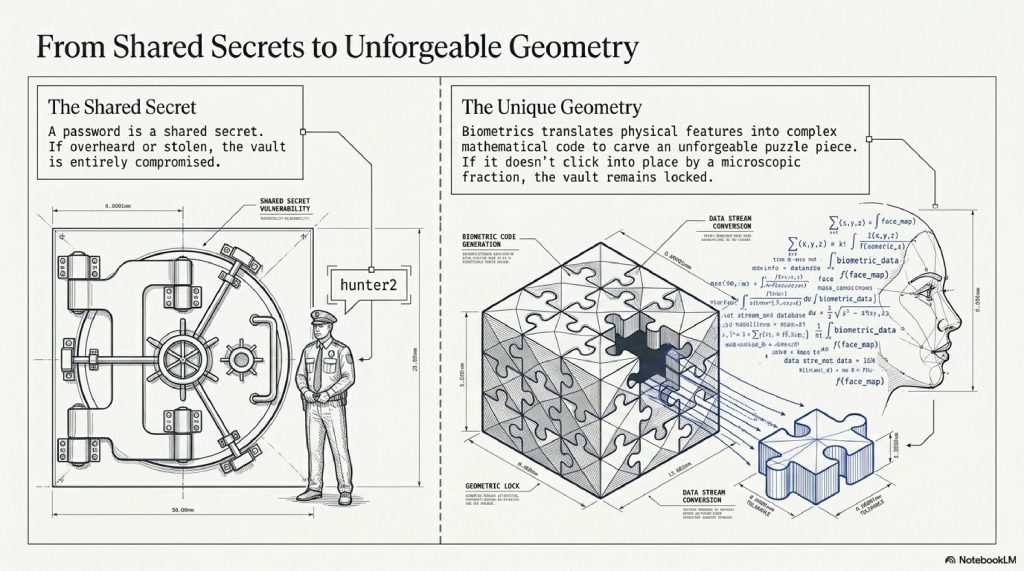
Instead, it translates your physical features into a massive, complex string of mathematical code. It uses this math to carve the shape of the missing puzzle piece.
From that day forward, whenever you try to open your bank app, the phone demands the puzzle piece. You present your thumb or your face. The phone measures it, runs the math, and tries to slide the piece into the puzzle. If it clicks seamlessly into place, the vault door swings open. If it doesn’t fit even by a microscopic fraction, the door remains locked.
B. STEP-BY-STEP BREAKDOWN: The Fraction of a Second
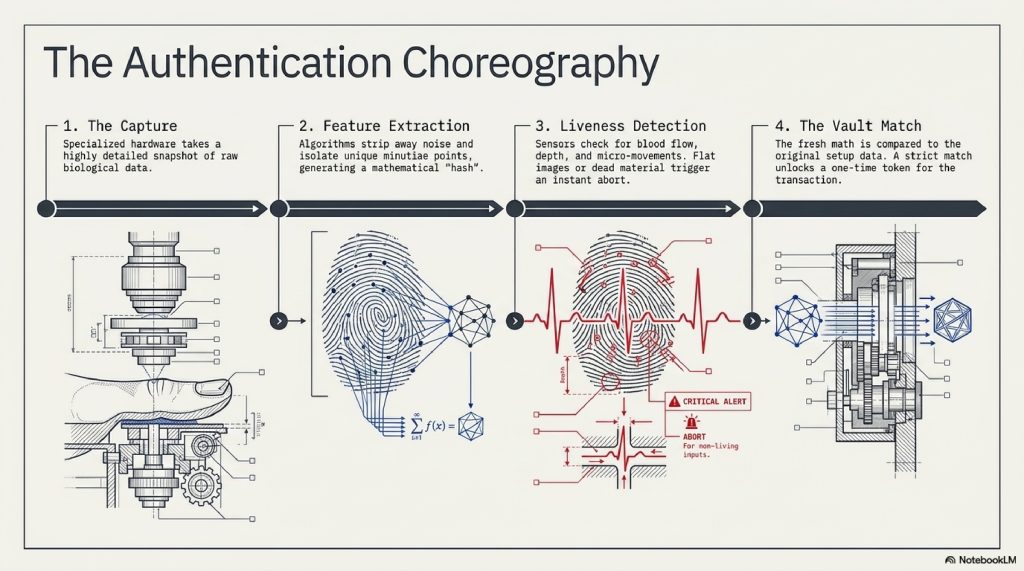
What exactly happens in the millisecond between your thumb touching the screen and your banking app opening? It is a perfectly choreographed sequence of four events.
Step 1: The Capture (The Sensor) The moment you trigger the prompt, specialized hardware wakes up. Depending on the device, an infrared camera flashes, a microscopic light illuminates your finger, or high-frequency sound waves are blasted against your skin. The hardware takes a highly detailed “snapshot” of your raw biological data.
Step 2: Feature Extraction (The Translation) The raw snapshot is useless to the computer. A software algorithm immediately strips away the unnecessary noise (like the lighting in the room or a smudge of dirt on your thumb). It isolates the unique “minutiae points”, where a fingerprint ridge splits into two, or the exact millimeter distance between the center of your pupils. It turns these points into a mathematical equation called a “hash.”
Step 3: Liveness Detection (The Pulse Check) Before proceeding, the system must ensure it isn’t being tricked by a high-resolution photograph or a 3D-printed mask. The sensors check for signs of life. Is there blood flow? Does the eye have depth and micro-movements? Does the fingerprint ridge have actual 3D texture? If it senses a flat image or dead material, the process instantly aborts.
Step 4: The Vault Comparison (The Match) The newly generated mathematical hash is sent to the phone’s deepest, most secure hardware vault. The vault compares the new math against the original math you created when you first bought the phone. If the numbers match within a strict margin of error, the vault sends a simple “YES” message to the banking app. The app unlocks.
C. REAL-WORLD EXAMPLES: Paying the Barista
Let’s return to the coffee shop. You are using Apple Pay or Google Pay.
When you double-click the side button of your phone, the payment chip (NFC) prepares to transmit your credit card data to the terminal. But the operating system halts the transmission. It essentially says, “Wait. I need authorization from the boss.”
Your phone’s screen illuminates. The infrared dot projector hidden in the “notch” or “Dynamic Island” at the top of the screen fires 30,000 invisible lasers at your face. The infrared camera reads how those lasers deform over the slope of your nose and the depth of your eye sockets.
The math is generated, verified, and approved.
The biometric system then unlocks a “Token” a one-time, fake credit card number generated specifically for this single cup of coffee. The phone transmits this fake number to the coffee shop’s card reader.
Your bank verifies the token, the coffee shop gets paid, and the barista never sees your real credit card number. All of this is authorized by the physical geometry of your face in roughly 0.8 seconds.
D. THE ADVANCED TECHNICAL LAYER: How Your Phone Actually “Sees”
Not all biometric sensors are created equal. The technology used to scan your body has evolved from simple cameras to military-grade radar systems.
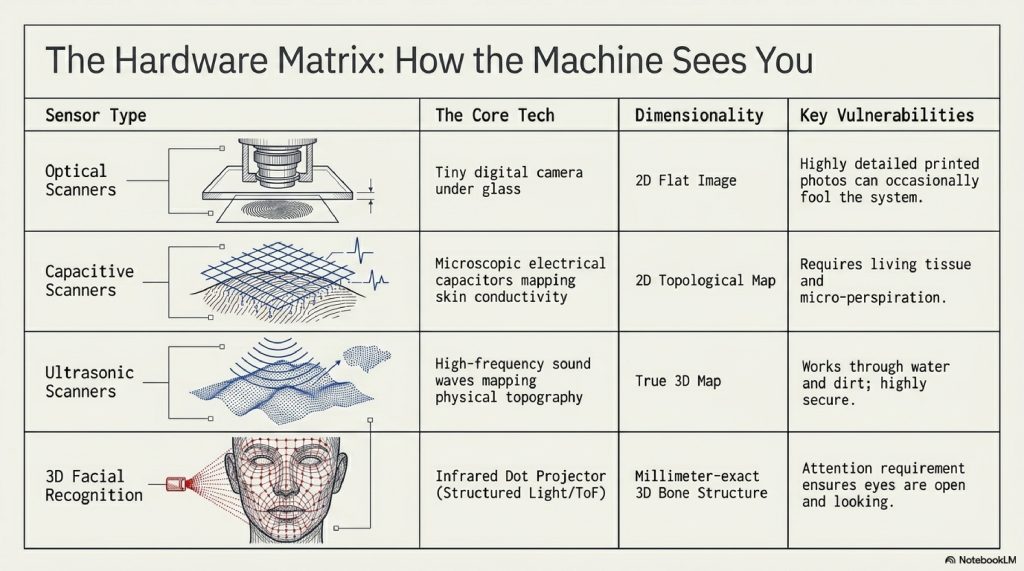
1. Optical Fingerprint Scanners (The Camera) Found in older phones or budget models, these are essentially tiny digital cameras placed under the glass. When you touch the screen, it lights up brightly to illuminate your thumb, taking a 2D photograph of your fingerprint. The Flaw: Because it is 2D, a highly detailed, printed photograph of your fingerprint can sometimes fool a basic optical scanner.
2. Capacitive Scanners (The Electric Grid) These were the scanners found on older iPhones (Touch ID) and classic Androids. They use an array of microscopic electrical capacitors. When your finger touches the pad, the raised “ridges” of your skin touch the capacitors, changing their electrical charge. The “valleys” (the gaps between ridges) do not touch the pad. This creates a highly accurate electrical map of your print.
3. Ultrasonic Scanners (The Sonar) This is the bleeding edge of under-display fingerprint tech, prominently used by Samsung. The screen blasts high-frequency ultrasonic sound waves at your thumb. These sound waves bounce back differently depending on whether they hit a ridge, a valley, or a pore. It creates a flawless, 3D topographical map of your thumb. Because it uses sound, it works even if your finger is wet, dirty, or greasy and it cannot be fooled by a 2D photograph.
4. 3D Facial Recognition (The Dot Projector) Basic facial recognition (found on many laptops and budget phones) just takes a 2D picture using the selfie camera. It is notoriously insecure. Apple’s Face ID and Microsoft’s Windows Hello use Structured Light or Time-of-Flight (ToF) sensors. They project a grid of tens of thousands of infrared dots onto your face. An infrared camera reads the grid. Because infrared light is invisible to humans, this works in pitch blackness. It measures the exact depth of your face down to the millimeter, mapping the unique bone structure beneath your skin.
E. THE SECURE ENCLAVE: Why Hackers Can’t Steal Your Face
Here is the most common, terrifying question people ask about biometrics: “If my bank password is stolen, I can change it. If a hacker steals the data for my face or my fingerprint, I can’t grow a new face. Am I compromised forever?”
It is a valid fear. If Apple or Google kept a massive, centralized database of everyone’s fingerprints on a server, it would be the greatest target for hackers in human history.
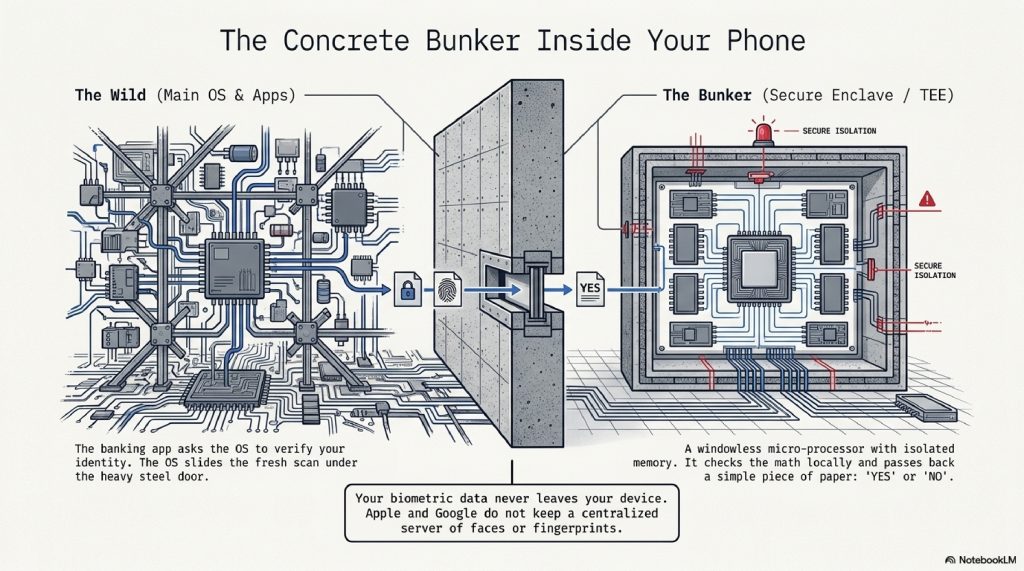
But they don’t. Your biometric data never leaves your device. When you scan your face or finger, the mathematical translation is sent to a microscopic, heavily armored computer chip inside your phone called the Secure Enclave (Apple) or the Trusted Execution Environment (TEE) (Android).
Think of the Secure Enclave as a windowless, concrete bunker located deep inside the phone’s processor. It has its own isolated memory. It runs its own micro-operating system.
Even the phone’s main operating system (iOS or Android) is absolutely forbidden from entering the bunker.
When you try to log into your bank, the banking app says to the phone’s operating system, “I need you to verify this person.” The operating system takes the fresh face scan, slides it under the heavy steel door of the Secure Enclave, and waits. Inside the bunker, the Secure Enclave checks the new scan against the original math it has stored locally. It then slides a piece of paper back under the door that simply says “YES” or “NO.”
The banking app, the operating system, and the manufacturer (Apple/Google) never see the mathematical blueprint of your face. Because it is stored locally on the physical chip in your hand, a hacker halfway across the world cannot steal it through the internet.
F. COMMON MYTHS ABOUT BIOMETRICS
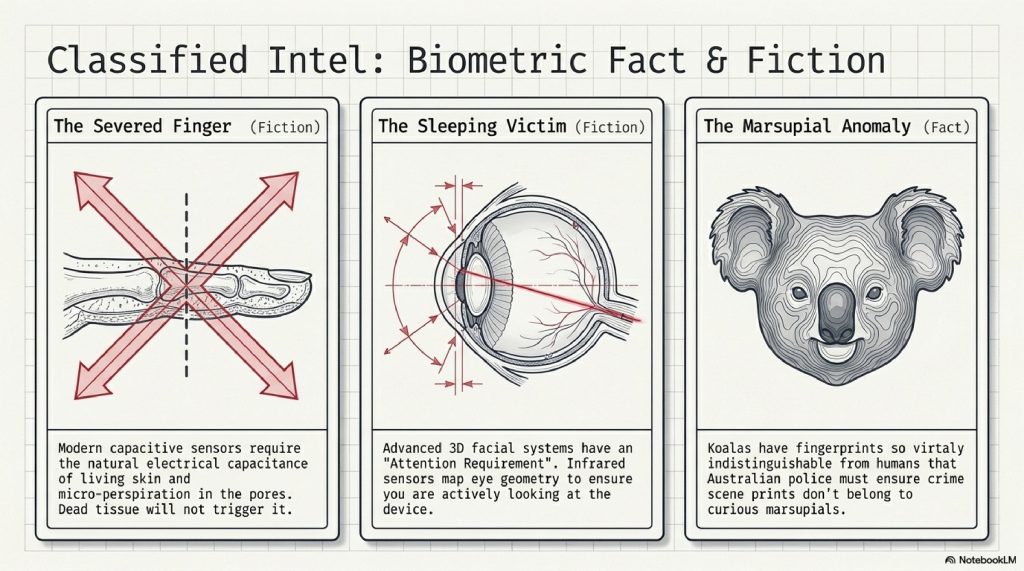
Myth 1: A thief can cut off my finger to unlock my phone. While a gruesome staple of Hollywood spy movies, this doesn’t work on modern devices. Modern capacitive sensors require the natural electrical capacitance of living human skin to register a touch. Furthermore, algorithms look for micro-perspiration (sweat) in the pores. Dead tissue will not trigger the sensor.
Myth 2: Someone can hold my phone up to my face while I’m sleeping to drain my bank account. Advanced 3D facial recognition systems have an “Attention Requirement” baked into the software. The infrared sensors map the geometry of your eyes to ensure they are open and actively looking at the device. If your eyes are closed, the vault stays locked.
Myth 3: Identical twins have the exact same fingerprints. They don’t. While identical twins share DNA, fingerprints are formed by amniotic fluid flow and pressure in the womb during pregnancy. Even identical twins have unique fingerprints, though their facial bone structures might occasionally fool older facial recognition software.
G. THE FUTURE: The Way You Walk and Type
Where does biometric security go when criminals start using AI and advanced 3D printing to try and spoof our faces?
The industry is moving toward Continuous Authentication and Behavioral Biometrics.
Currently, once you unlock your phone, it blindly trusts you until the screen goes to sleep. In the near future, your device will constantly verify your identity in the background using the unique ways you interact with the world:
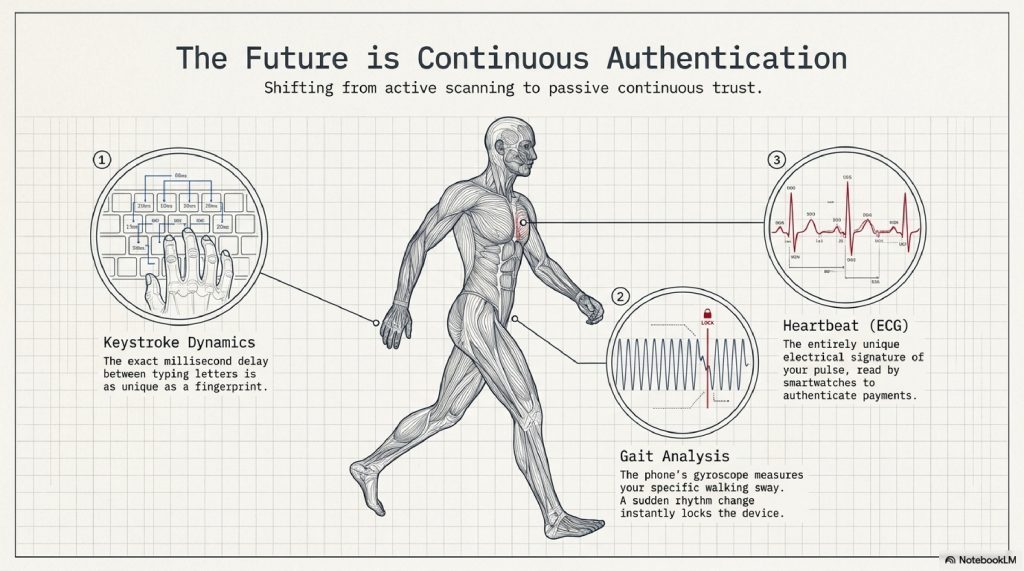
- Keystroke Dynamics: You have a unique rhythm. The exact millisecond delay between how you type the letter ‘S’ and the letter ‘T’ is as unique as your fingerprint.
- Gait Analysis: The gyroscope in your phone can measure the specific sway and bounce of your hips as you walk. If a thief steals your unlocked phone and runs away, the phone will realize the “walking rhythm” has suddenly changed and instantly lock itself.
- Heartbeat (ECG) Biometrics: The electrical signature of your heart is entirely unique. Future smartwatches and devices may authenticate payments simply by verifying the electrical rhythm of your pulse.
You will no longer need to actively “unlock” a device. The device will simply know who is holding it.
H. SURPRISING FACTS YOU DIDN’T KNOW
- The Koala Dilemma: Koalas have fingerprints that are virtually indistinguishable from human fingerprints, even under an electron microscope. Police in Australia have historically had to ensure crime scene prints didn’t belong to curious marsupials.
- The Ancient Origins: Biometric authentication isn’t new. In ancient Babylon (around 500 BC), business transactions recorded on clay tablets were “signed” using fingerprints pressed into the wet clay to prevent forgery.
- Changing with Age: Your fingerprint ridges can actually wear down over time due to age, manual labor (like bricklaying), or harsh chemicals, forcing you to re-register your prints on your devices as you get older.
I. FAQ SECTION
1. Is biometric authentication 100% foolproof? Nothing in cybersecurity is 100%. While bypassing modern 3D facial recognition or ultrasonic fingerprints is incredibly difficult and expensive, a highly targeted, well-funded attack (like a nation-state creating a multi-million-dollar 3D mask) is theoretically possible, but highly unlikely for average consumers.
2. Can the police force me to unlock my phone with my face or fingerprint? In the United States, the law is currently a gray area, but generally, courts have ruled that police can compel you to unlock a phone with a fingerprint or face (biometrics are considered physical evidence), whereas they cannot compel you to give up a passcode (which is protected by the 5th Amendment right against self-incrimination).
3. What happens if I get a scar on my finger or face? Minor cuts won’t usually disrupt the algorithm, as it maps dozens of points and only needs a certain percentage to match. However, a major scar that alters your geometry will require you to use your backup PIN and re-scan your biometrics.
4. Why does my phone sometimes ask for my PIN even when I have Face ID? This is a security failsafe. If your phone reboots, if you haven’t unlocked it in 48 hours, or if it registers five failed biometric attempts in a row, the Secure Enclave intentionally shuts off biometric access until the master passcode is entered to prove you are still in control.
5. Do glasses or beards mess up facial recognition? Modern 3D facial recognition uses machine learning to adapt. It maps the bone structure around your eyes and cheeks. It easily sees through standard glasses (even some sunglasses, if infrared can pass through the lenses) and slowly learns and updates your mathematical model as your beard grows.
6. Can my biometric data be used to track me across the internet? No. Because the mathematical hash of your face or fingerprint never leaves the Secure Enclave of your physical device, tech companies cannot cross-reference it with internet browsing data to track you.
7. Why is my bank app asking for biometrics when the phone is already unlocked? Your banking app demands a “fresh” authentication. Just because the phone was unlocked 10 minutes ago doesn’t mean you are the one holding it now. The app requests the operating system to perform a brand-new, real-time check before revealing your account balance.
8. Are voice-recognition passwords safe for banking? Voice recognition is increasingly considered the weakest biometric. With the rise of advanced AI voice-cloning software, a hacker only needs a 3-second audio clip of you speaking (pulled from a social media video) to clone your voice and potentially bypass older voice-authentication systems.
9. Can I use biometrics to log into websites on my computer? Yes. Standards like FIDO (Fast IDentity Online) and WebAuthn allow you to use your phone’s fingerprint scanner or Face ID as a “security key” to log into websites on your desktop browser, replacing passwords entirely.
10. What is a “False Acceptance Rate” (FAR)? FAR is the metric engineers use to define security. It is the probability that the system will incorrectly match a random person to your biometric data. For Apple’s Face ID, the stated FAR is 1 in 1,000,000 (meaning there is a 1 in a million chance a random stranger could unlock your phone).
J. OTHER BLOG SUGGESTIONS
- How DNS Works: Translating Website Names into IP Addresses
- How Spacecraft Communicate Across Millions of Kilometers
- How Global Shipping Systems Work: The World’s Physical Internet
- How Data Centers Power the Entire Internet
K. CONCLUSION
The transition from passwords to biometrics represents a profound philosophical shift in how we interact with machines. For the entirety of the computing age, we had to prove our identity by memorizing the machine’s language strings of arbitrary letters, numbers, and symbols. We had to adapt to the computer.
Now, the computer has adapted to us.
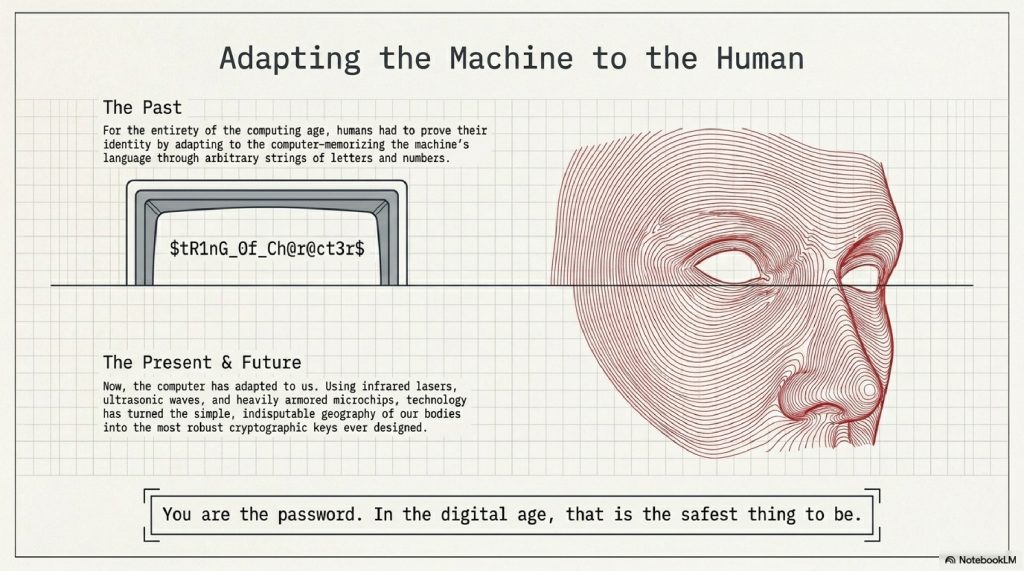
By utilizing infrared lasers, ultrasonic waves, and heavily armored microchips, technology has mapped the geography of our bodies. It has turned the ridges of our skin and the geometry of our cheekbones into the most robust cryptographic keys ever designed.
The next time you tap your phone to pay for a coffee, take a moment to appreciate the invisible, high-speed interrogation happening beneath the glass. Your money is no longer guarded by a word you might forget or a physical key you might lose. It is guarded by the simple, indisputable fact of your existence. You are the password. And in the digital age, that is the safest thing to be.
Comment