INTRODUCTION
Look at the device in your hands. You tap a glass screen, and instantly, a high-definition video begins to play. You open a web browser, and a complex application loads before you can even blink. You speak to an AI, and it replies in a perfectly synthesized human voice.
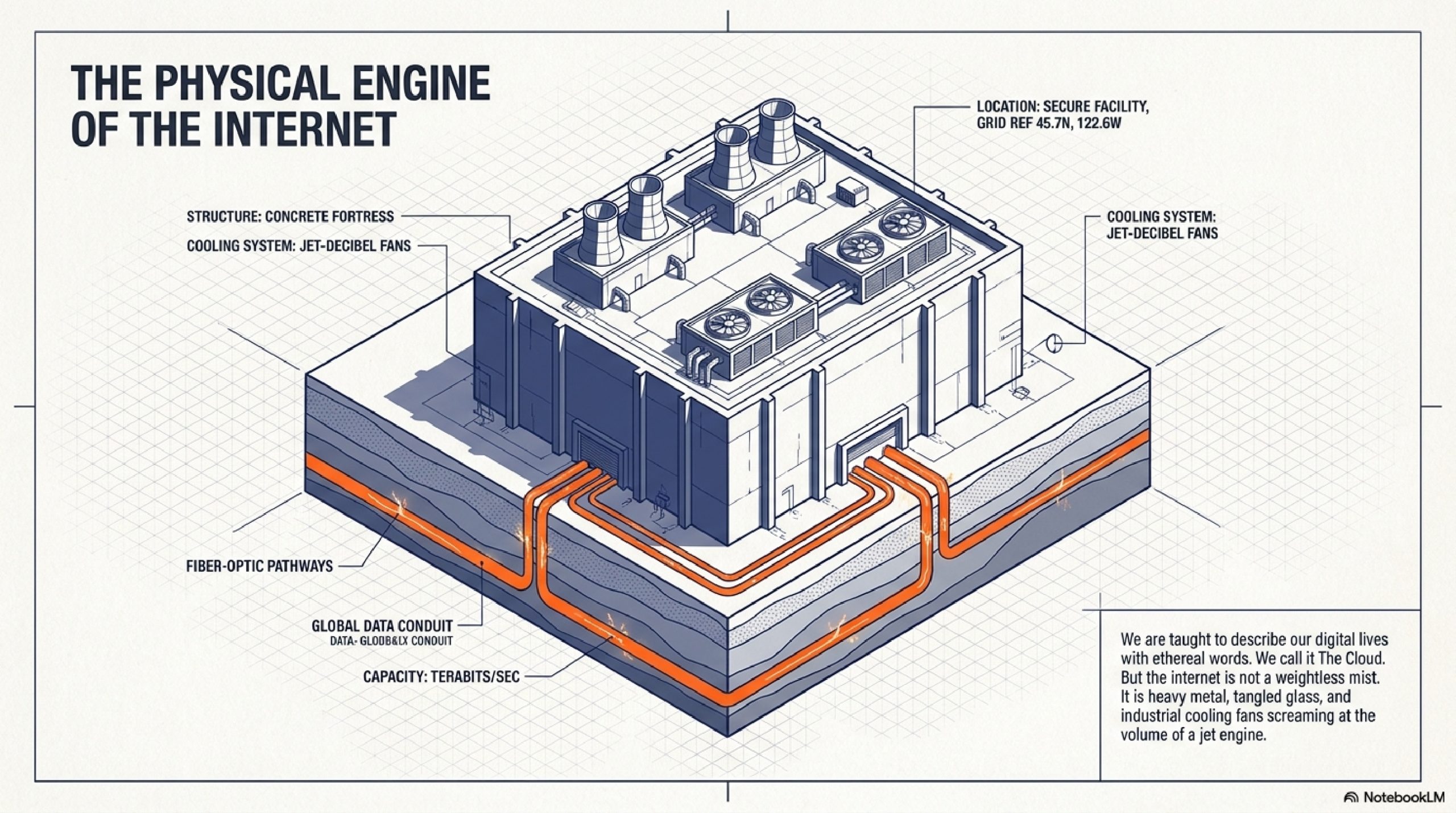
We are taught to describe this magic with soft, ethereal words. We call it “The Cloud.” We talk about uploading files to the “ether.” It implies that our digital lives float weightlessly above us in an invisible, magical atmosphere.
The Cloud is a brilliant marketing lie.
There is no cloud. There are only heavily armed, windowless fortresses sitting in industrial parks across the world. Inside these concrete bunkers, the internet is not a weightless mist. It is heavy metal. It is miles of tangled fiber-optic glass, rows of blinking silicon brains, and industrial cooling fans screaming at the volume of a jet engine.
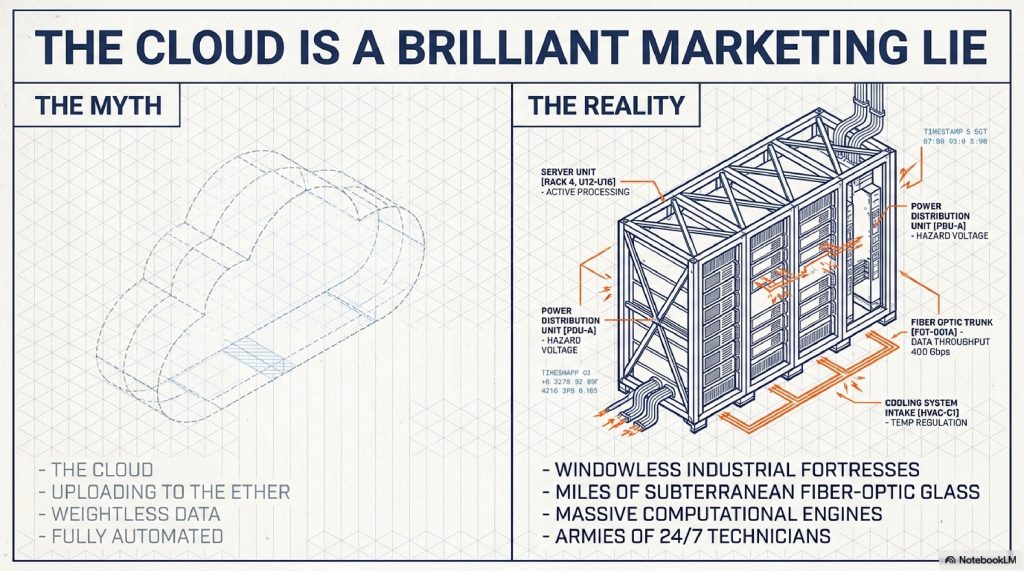
The internet is intensely physical. Every time you stream a video, send a message, or load a website, you are physically manipulating electricity inside a building that might be thousands of miles away.
But how does it actually work? How does a sprawling warehouse in rural Virginia or the freezing plains of Iceland manage to capture your click, process it, and shoot it back to your phone in a fraction of a second?
If we strip away the magic, the internet reveals itself to be the most complex, perfectly choreographed logistics machine humanity has ever built. Today, we are opening the heavy steel doors of the data center. We are going to trace the exact physical journey of your digital requests, explore the engineering required to keep the internet from melting down, and look at how the artificial intelligence boom is pushing these massive facilities to their absolute limits.
TABLE OF CONTENTS
- The Simple Explanation: The Infinite Library
- Step-by-Step Breakdown: The Journey of a Click
- Real-World Example: Deploying the Modern Web
- The Advanced Technical Layer: Inside the Server Rack
- Fighting the Heat: The Engine Room of the Internet
- Common Myths About Data Centers
- The Future: AI, Liquid Cooling, and Nuclear Power
- Interesting Facts You Didn’t Know
- FAQs
- Other Blog Suggestions
- Conclusion
A. THE SIMPLE EXPLANATION: The Infinite Library
To understand a data center, forget about technology for a minute. Imagine a massive, sprawling library.
This library doesn’t just store books; it has an army of hyper-speed librarians inside. When you want to read a specific page of a book, you don’t walk into the library yourself. Instead, you send a messenger (your internet connection) with a slip of paper requesting the page.
The messenger arrives at the library doors. A security guard checks the request to make sure it’s valid. Then, a highly organized manager points the messenger down a specific aisle. A librarian sprints down the aisle, grabs the exact book, photocopies the page you asked for, hands it to the messenger, and the messenger sprints back to your house.
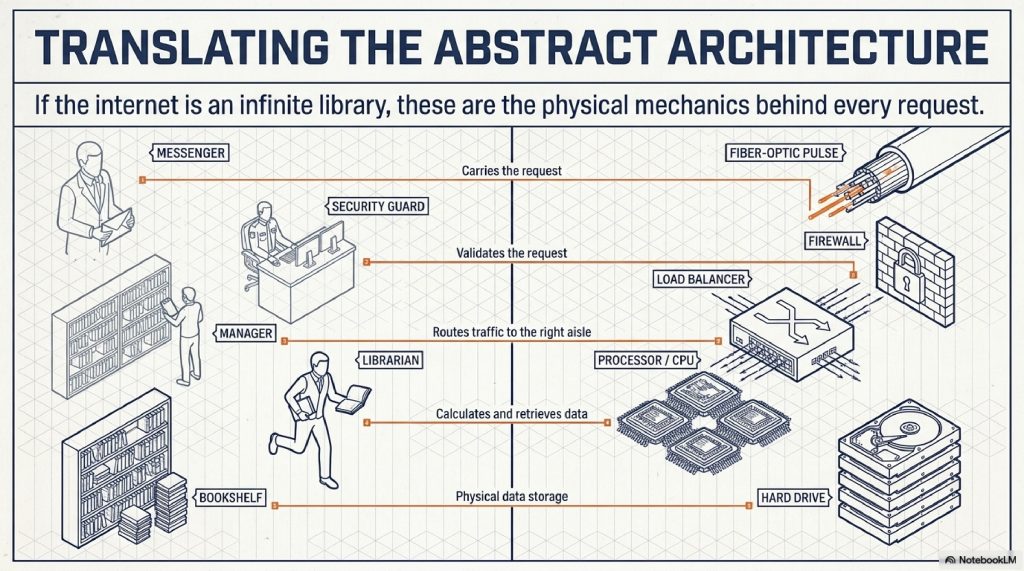
A Data Center is that library.
- The Books are hard drives storing data (videos, images, website code).
- The Librarians are processors (CPUs and GPUs) calculating and retrieving the data.
- The Managers are network switches routing traffic.
- The Messengers are pulses of light traveling through fiber-optic cables under the oceans and streets.
Whenever you save something to the “cloud,” you are simply renting a tiny piece of a bookshelf in someone else’s physical library.
B. STEP-BY-STEP BREAKDOWN: The Journey of a Click
What physically happens inside a data center when you interact with the web? Let’s slow time down to the millisecond and watch the mechanics unfold.
Step 1: The Request Hits the Perimeter You type a web address into your browser and hit enter. Your request travels through local cables to your Internet Service Provider, bounces onto a high-speed fiber-optic backbone, and arrives at the physical data center where that website is hosted.
Step 2: The Load Balancer (The Traffic Cop) Your request doesn’t just bump into a computer; it hits a “Load Balancer.” Massive websites receive millions of clicks a second. If they all went to one computer, it would immediately crash. The load balancer acts like a traffic cop, looking at rows of thousands of computers and saying, “Server #402 is busy, but Server #403 is free. Send this request to #403.”
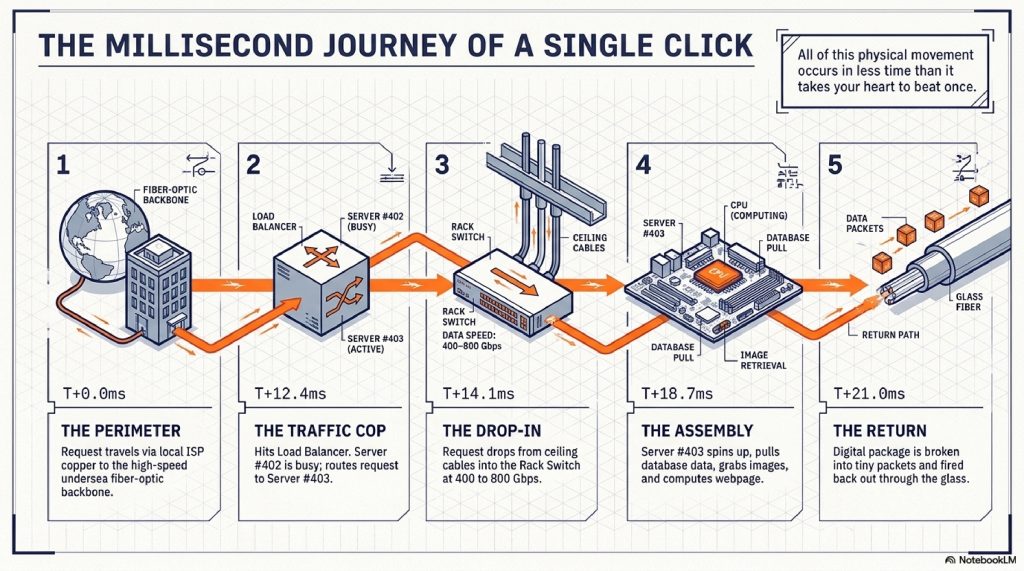
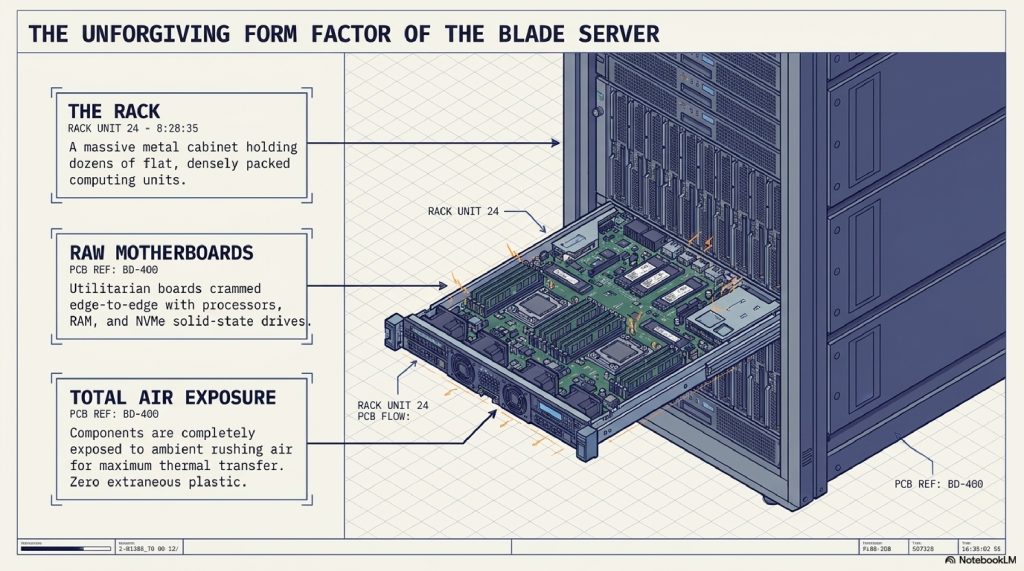
Step 3: The Switch and the Rack The request travels down copper or fiber cables suspended from the ceiling. It reaches a massive metal cabinet called a “Rack,” which holds dozens of flat, pizza-box-sized computers stacked on top of each other. At the top of the rack is a “Switch,” which takes the request and routes it into the exact slot where Server #403 lives.
Step 4: Computation and Assembly Server #403 receives the request. This isn’t just a matter of grabbing a file. The server often has to build the page for you. Its processor spins up, pulling user data from a database drive, grabbing images from a storage drive, and running code to assemble the webpage perfectly for your specific screen size.
Step 5: The Return Journey The assembled digital package is broken down into tiny packets of data, fired back up through the switch, out past the load balancer, into the fiber-optic network, and back to your phone.
All of this happens in less time than it takes your heart to beat once.
C. REAL-WORLD EXAMPLE: Deploying the Modern Web
Let’s look at a practical scenario. Imagine a developer is building a modern web application, perhaps an interactive chess interface or a complex real-time dashboard. They code the app using a framework like Next.js and host the database on Firebase.
When they hit “Deploy,” their code doesn’t just vanish into the ether. It is physically transmitted to a data center owned by a company like Google or Serverbyt.
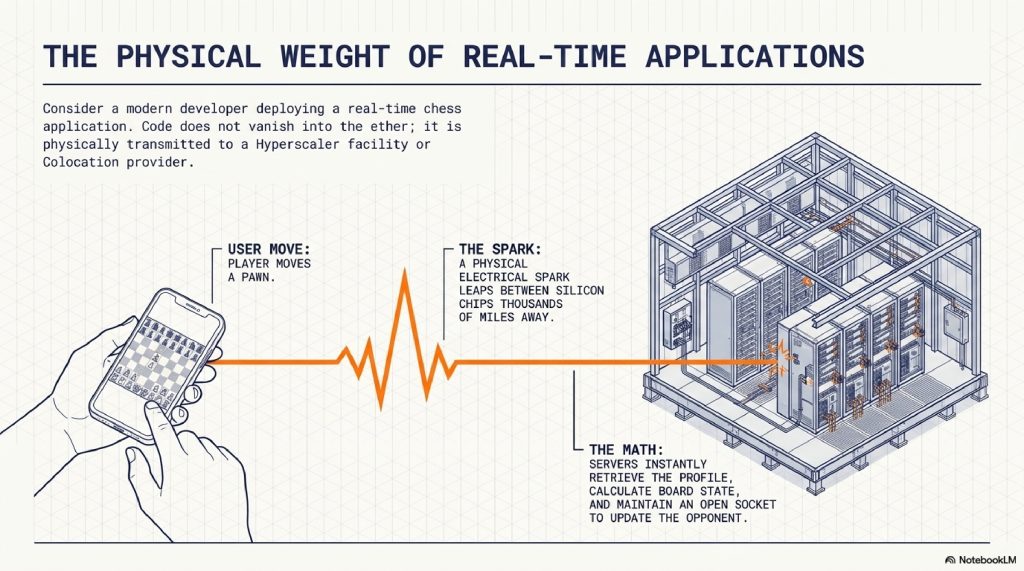
When a user logs into that chess app to play a match, their browser sends a signal to the data center. The data center’s servers must instantly retrieve the user’s profile from the Firebase database, calculate the board state, and maintain a constant, open socket connection so that when a pawn moves, the opponent sees it instantly.
Every single move, every database write, and every real-time update is a physical electrical spark leaping between silicon chips in that distant warehouse. The seamless experience of modern web development is entirely dependent on these massive facilities operating with zero downtime.
D. THE ADVANCED TECHNICAL LAYER: Inside the Machine
To keep intelligent readers satisfied, we need to look closer at the hardware. A single data center can house tens of thousands of servers. They are meticulously designed for absolute efficiency and extreme paranoia.
The Blade Server If you open a server rack, you won’t see computer towers. You see “blades”, ultra-thin servers that slide into the rack. Because space is money, these blades have no monitors, no mice, and no extraneous plastic. They are just raw motherboards covered in CPUs, RAM, and NVMe solid-state drives, all exposed to the rushing air.
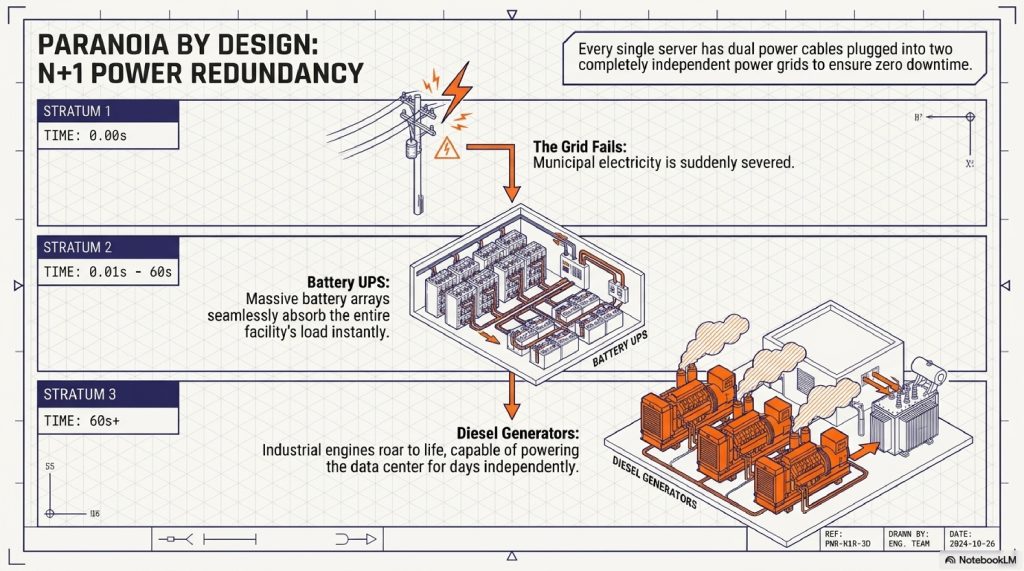
Redundancy (N+1) Data centers operate on a philosophy of extreme paranoia called “Redundancy.” The goal is 99.999% uptime (known as the “Five Nines”). If a component fails, the internet cannot go down.
- Dual Power: Every server has two power cables plugged into two completely different power grids.
- UPS Systems: If the city power grid goes down, massive rooms filled with lead-acid or lithium-ion batteries immediately take over the load for about 60 seconds.
- Diesel Generators: During those 60 seconds, massive, locomotive-sized diesel generators situated outside the building roar to life, capable of powering the data center for days without city grid assistance.
E. FIGHTING THE HEAT: The Engine Room of the Internet
When you cram tens of thousands of high-performance processors into one building, you create an astonishing byproduct: Heat.
Just like squeezing a high-performance engine into a tight car chassis creates a massive thermal management problem, cramming thousands of CPUs into a server rack threatens to melt the silicon. If a data center’s cooling system fails, the servers will physically destroy themselves within minutes.
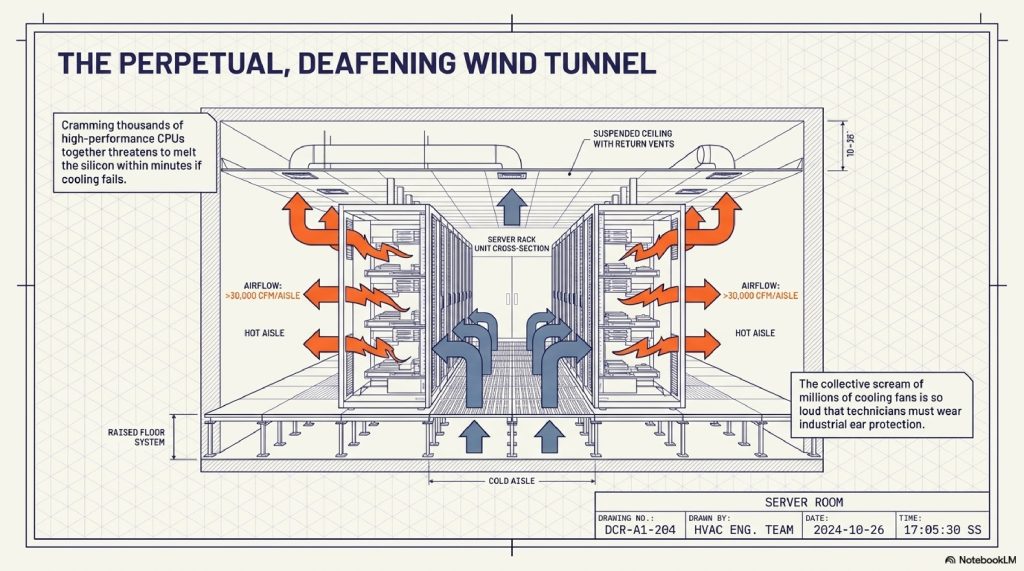
Hot Aisle / Cold Aisle Containment Walk into a data center, and you’ll notice the servers are arranged in highly specific rows. The front of the servers faces one aisle; the back faces another. Industrial air conditioners blast freezing air up through the floor into the “Cold Aisle.” The servers suck this freezing air in through their front vents, pass it over their blazing-hot processors, and blast the resulting hot air out the back into the “Hot Aisle.” This exhausted hot air is then sucked into the ceiling to be cooled down again. It’s a perpetual, deafening wind tunnel.
F. COMMON MYTHS ABOUT DATA CENTERS
Myth 1: The “Cloud” just stores data. Reality: Storage is only half the job. Data centers are massive computational engines. When you use an app to translate a language or process a photo, your phone isn’t doing the hard math. The data center’s processors are doing the heavy lifting and sending the result back to you.
Myth 2: Data centers are fully automated and run themselves. Reality: While software manages the data, the physical maintenance is constant. Armies of technicians roam the aisles 24/7, swapping out dead hard drives, replacing fried motherboards, and checking miles of fiber-optic cabling.
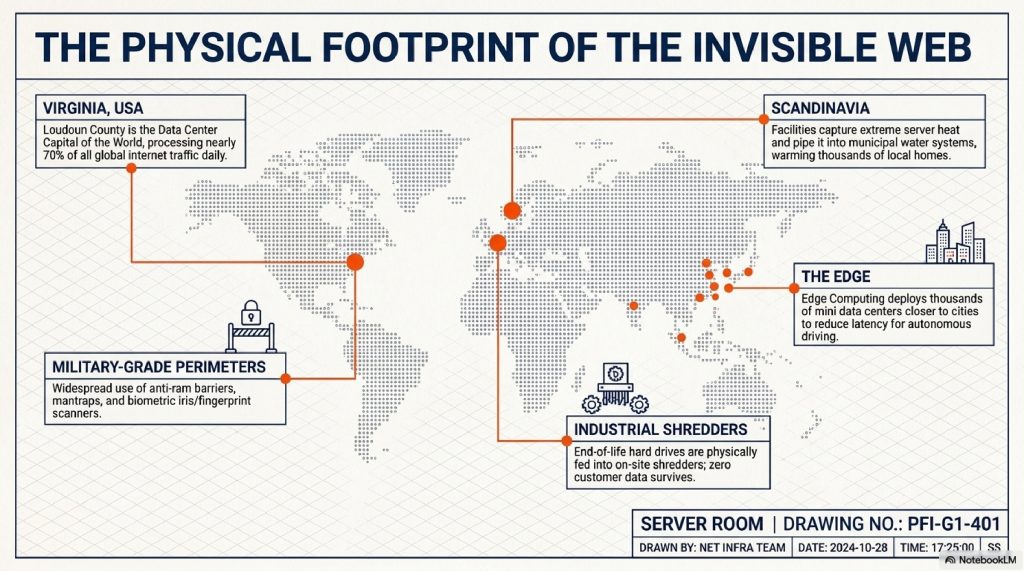
Myth 3: They are located everywhere equally. Reality: Data centers cluster in highly specific geographic regions due to cheap electricity, cool climates, or proximity to major underwater internet cable landings. Loudoun County, Virginia, for example, is the “Data Center Capital of the World,” processing nearly 70% of all global internet traffic daily.
G. THE FUTURE: AI, Liquid Cooling, and Nuclear Power
The internet is currently undergoing a violent evolution. The rise of Artificial Intelligence is forcing a complete redesign of how data centers are built.
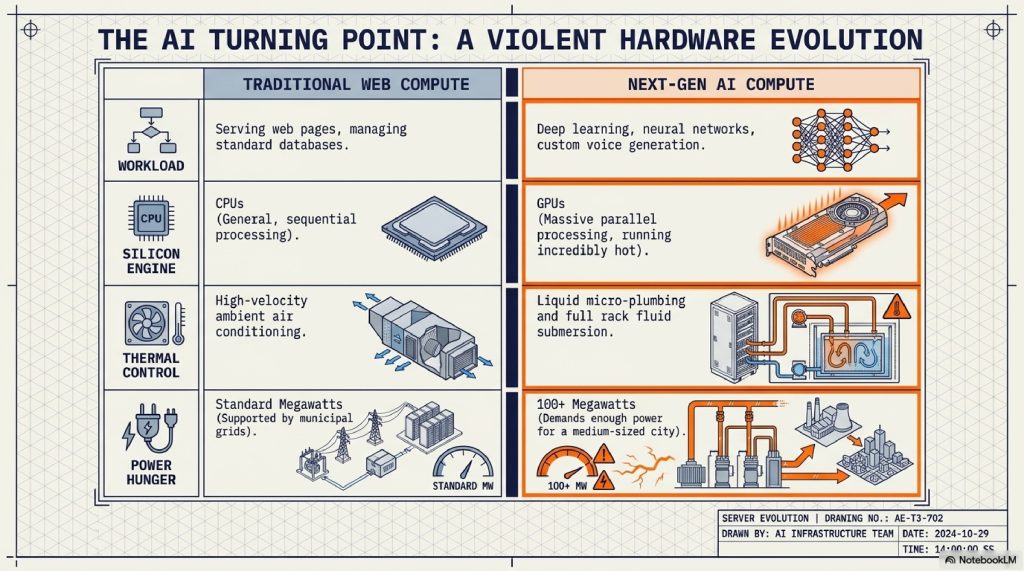
Training complex neural networks like generating highly customized AI voice packs or running deep learning evaluations like Stockfish NNUE requires a fundamentally different type of computing. It relies on GPUs (Graphics Processing Units), which run incredibly hot and demand vast amounts of electricity.
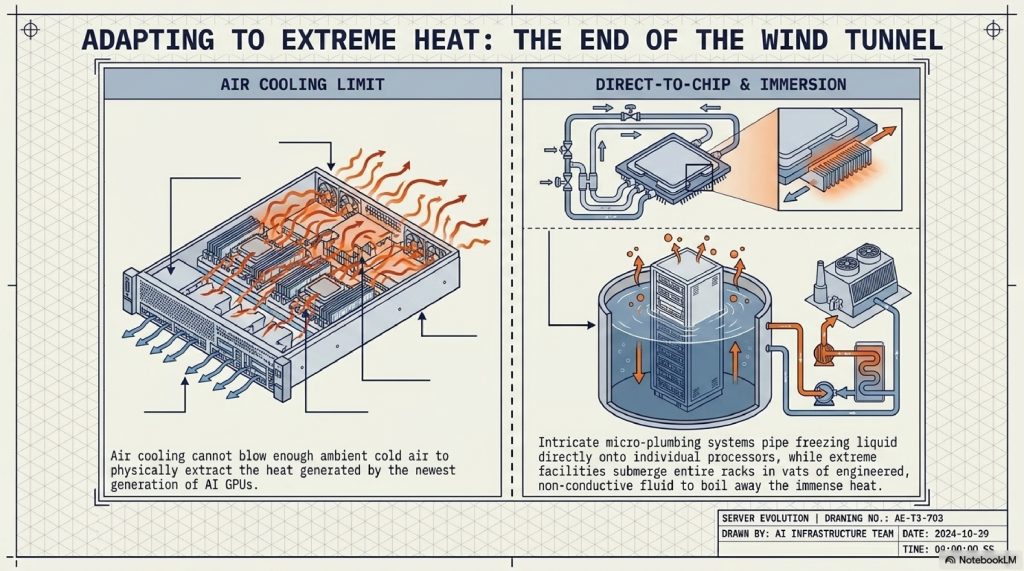
Liquid Cooling Air cooling is reaching its physical limits. You simply cannot blow enough air to cool the newest AI servers. The future is liquid. Data centers are now installing intricate plumbing systems that pipe cold liquid directly over the processors. Some advanced facilities even submerge entire server racks in giant vats of engineered, non-conductive fluid.
The Power Problem The AI boom has created an insatiable hunger for electricity. Some of the newest mega-data centers require 100 megawatts or more to operate, enough to power a medium-sized city. To guarantee uninterrupted, zero-carbon power, massive tech companies are now looking to the ultimate energy source: Nuclear. We are entering an era where future data centers will be built alongside their own dedicated Small Modular Nuclear Reactors (SMRs).
H. INTERESTING FACTS YOU DIDN’T KNOW
- You Can’t Hear Yourself Think: Inside the server rooms, the collective scream of millions of tiny cooling fans is so loud that technicians must wear industrial ear protection to avoid hearing damage.
- Warming Up Cities: In Scandinavia, several data centers capture the immense heat generated by their servers and pipe it into the local municipal water system, literally heating thousands of nearby homes with the byproduct of internet traffic.
- Security is Military-Grade: Physical security is often tighter than an airport. Getting into a top-tier data center requires passing through anti-ram barriers, mantraps (small rooms where one door must close before the next opens), and biometric scanners that read your fingerprints or the iris of your eye.
I. FAQS
1. What is the difference between a data center and the cloud? “The Cloud” is a concept and a software model that lets you access computing resources over the internet. A “Data Center” is the actual, physical building that houses the computers making the cloud possible.
2. How much of the internet is stored in data centers? Virtually all of it. Every website, every streaming service, every online multiplayer game, and every cloud backup physically lives on a hard drive inside a data center.
3. Do data centers go down in natural disasters? Rarely. They are built to withstand hurricanes, earthquakes, and floods. They have massive backup generators and are usually built far away from known fault lines and flood plains.
4. Why are data centers kept so cold? Computers generate heat. If tens of thousands of computers are placed in a room together without massive air conditioning, the ambient temperature would skyrocket, melting the delicate silicon components within minutes.
5. Who owns the data centers? There are “Hyperscalers” like Amazon (AWS), Google, and Microsoft, which build their own massive facilities. There are also “Colocation” providers, massive real estate companies that build the warehouse and rent out server space to thousands of smaller businesses.
6. What happens to old hard drives in a data center? For security reasons, when a hard drive reaches the end of its life, it is never thrown in the trash. It is physically fed into an industrial shredder on-site, ensuring no customer data can ever be recovered.
7. How fast is the internet inside a data center? The internal network speeds are almost incomprehensible. While a fast home internet connection might be 1 Gigabit per second, the switches connecting servers inside a modern data center regularly push 400 to 800 Gigabits per second.
8. Can anyone visit a data center? No. Most data centers are strictly off-limits to the public. They don’t even have signs on the outside of the building to prevent drawing attention to the critical infrastructure inside.
9. Are data centers bad for the environment? They do consume massive amounts of electricity and water (for cooling). However, major tech companies are the largest purchasers of renewable energy in the world, heavily investing in solar and wind to offset their carbon footprint.
10. What is “Edge Computing”? Instead of having one giant data center far away, edge computing involves placing thousands of smaller “mini” data centers closer to cities. This reduces the distance data has to travel, making things like autonomous driving and real-time gaming much faster.
J. INTERNAL LINKING SUGGESTIONS
- How Air Traffic Control Prevents Plane Collisions
- How Undersea Internet Cables Carry the World’s Data
K. CONCLUSION
The next time you pull a phone from your pocket to check a score, deploy a new piece of code, or ask an AI a question, pause for a fraction of a second.
Think about the invisible chain reaction you just ignited. Your simple action sent a pulse of light screaming across miles of subterranean glass, breaching the concrete walls of a hyper-secured fortress, and triggering a microscopic dance of electricity deep inside a silicon chip. You commanded an industrial machine that draws enough power to light up a city, all so that a single piece of information could cross the world and appear in the palm of your hand.
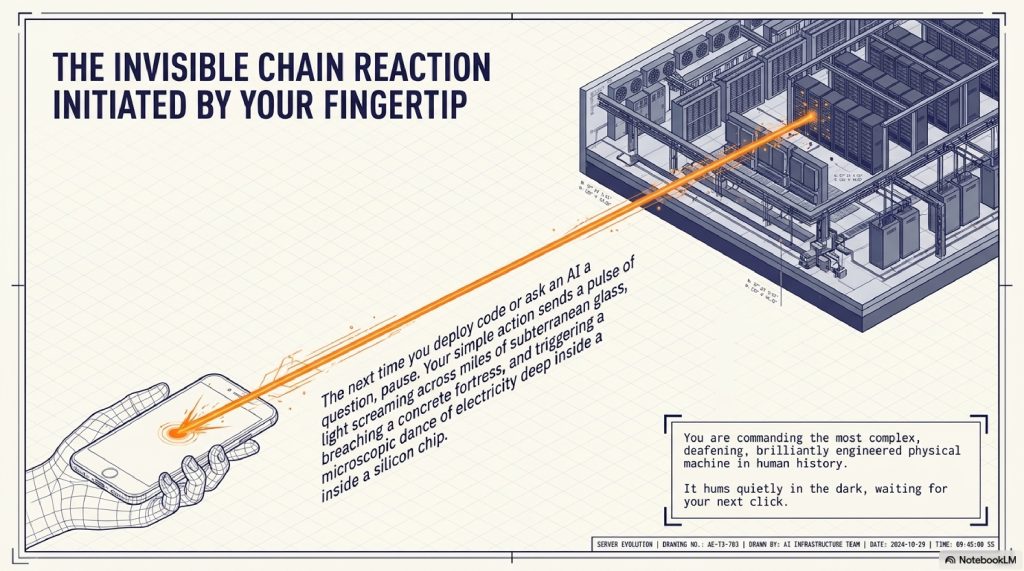
The internet is not a cloud. It is a sprawling, deafening, brilliantly engineered physical engine. It is the most complex infrastructure project in human history, humming away quietly in the dark, waiting for your next click.
Comments (2)