INTRODUCTION
The scene is familiar, almost comforting. You walk into a bustling airport terminal, stressed by a layover, or settle into a corner chair at a local coffee shop. Your phone vibrates. A notification appears: “Free Public Wi-Fi Available.”
With a quick tap, you’re connected. You check your bank balance, send a few work emails, and scroll through social media. To you, it feels like a convenience, a gift of connectivity in a digital world. But to a silent observer sitting just three tables away with a $50 device hidden in a backpack, you’ve just walked into a digital minefield.
Most of us treat Wi-Fi like air, invisible, essential, and presumably safe. However, the air in that coffee shop is thick with data. Every photo you send, every password you type, and every private message you draft is being converted into radio waves. In a secure home environment, those waves are locked in a digital vault. On public Wi-Fi? The vault door is wide open, and the lights are off.
We are currently living through a “golden age” for cybercriminals. As our lives have migrated into the cloud, the tools required to intercept that life have become cheaper, faster, and more automated. You don’t need to be a hooded hacker in a dark basement to steal a digital identity anymore; you just need a laptop and a lack of ethics.
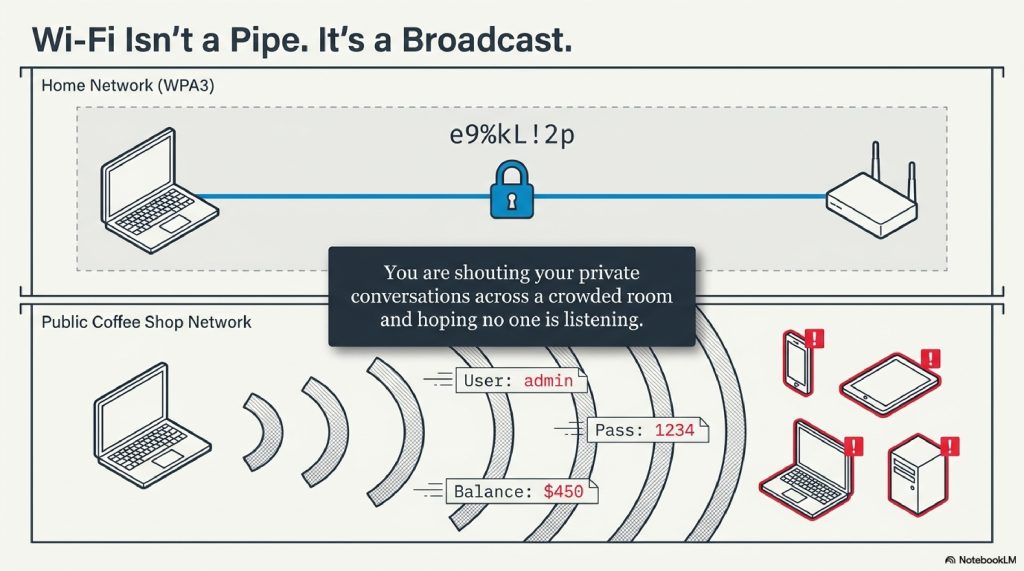
This isn’t just about “getting hacked.” It’s about the fundamental way radio communication works. When you use public Wi-Fi, you are essentially shouting your private conversations across a crowded room and hoping that no one is listening.
In this deep dive, we are going to strip away the “magic” of the internet to reveal the machinery underneath. We’ll explore how a “Man-in-the-Middle” actually stands between you and your data, why “Evil Twins” are lurking in your favorite spots, and how you can turn your vulnerable device into a digital fortress.
By the end of this guide, you will never look at a “Free Wi-Fi” sign the same way again.
TABLE OF CONTENTS
- The Invisible Broadcast: How Wi-Fi Actually Works
- The Anatomy of a Trap: Why “Free” Isn’t Free
- The Man-in-the-Middle (MITM): The Digital Eavesdropper
- The Evil Twin: When Your Phone Lies to You
- Packet Sniffing: Reading the Airwaves
- The HTTPS Myth: Is It Enough?
- How to Protect Yourself: The Digital Armor
- The Future of Wi-Fi Security: WPA3 and Beyond
- Interesting Facts About Wi-Fi
- FAQs
The Invisible Broadcast: How Wi-Fi Actually Works
To understand the danger, you first have to understand the medium. Wi-Fi isn’t a “connection” in the way a physical cable is. It is radio.
When you send a request to a website, say, clicking on a link, your device’s wireless adapter takes that data and translates it into a radio signal. This signal is broadcast through the air to a wireless router. The router then “hears” that signal, decodes it, and sends it through a physical wire to the broader internet.
1. The “Crowded Room” Analogy
Imagine you are in a crowded, noisy ballroom. You want to tell a friend across the room a secret. Because you can’t walk over to them, you have to shout it. You hope your friend is the only one listening, but in reality, everyone in that room can hear your voice.
In a home Wi-Fi setup (using WPA2 or WPA3 encryption), it’s as if you and your friend are speaking a secret, coded language that only the two of you understand. Even if others hear you, they can’t make sense of the sounds.
On Public Wi-Fi, however, you are often shouting in plain English. Anyone with a “hearing aid” (a wireless network adapter in monitor mode) can sit back and record every word you say.
[Visual Suggestion: An infographic showing the difference between Encrypted (Coded) vs. Unencrypted (Plain Text) data transmission.]
2. The Anatomy of a Trap: Why “Free” Isn’t Free
Why is public Wi-Fi so inherently risky compared to your home or office network? It comes down to three factors: Visibility, Accessibility, and Intent.
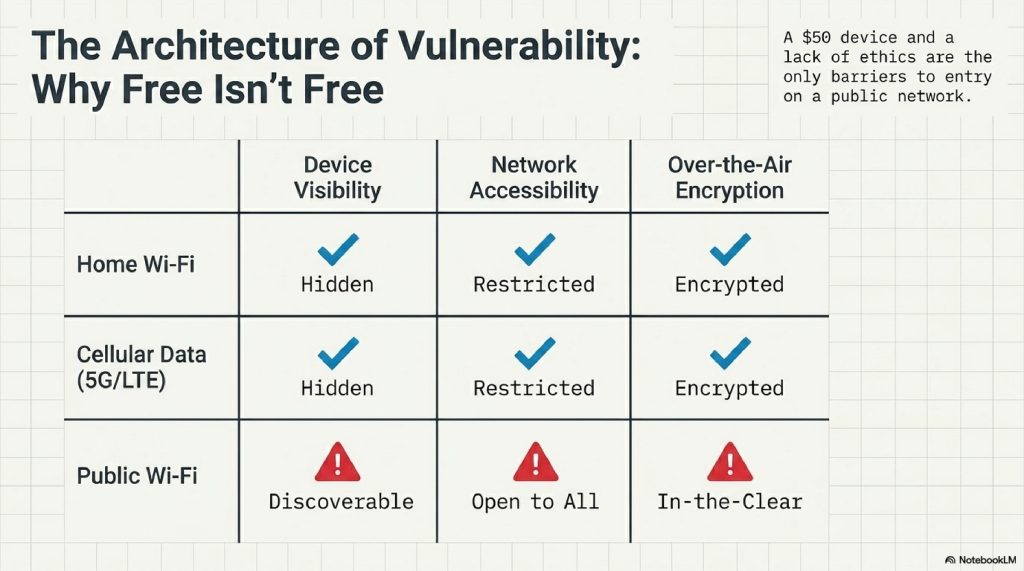
- Visibility: On a public network, your device is “discoverable.” This means other devices on the same network can “see” your phone or laptop, looking for open ports or software vulnerabilities.
- Accessibility: Because there is usually no password or a password shared by hundreds of people, there is no barrier to entry for a malicious actor.
- Lack of Encryption: Many public hotspots do not use over-the-air encryption. This means the data traveling between your laptop and the router is “in the clear.”
3. The Man-in-the-Middle (MITM): The Digital Eavesdropper
The Man-in-the-Middle attack is the “bread and butter” of Wi-Fi hacking. It is as cinematic as it sounds: a third party inserts themselves into the conversation between your device and the website you are visiting.
Step-by-Step: How a MITM Attack Happens
- The Bait: A hacker joins the same public Wi-Fi as you.
- The Trick (ARP Spoofing): The hacker’s computer sends out a “spoofed” message to your device, saying, “Hey, I’m the router!” Simultaneously, it tells the real router, “Hey, I’m the user’s laptop!”
- The Interception: Your device, believing the hacker is the gateway to the internet, sends all its data to the hacker. The hacker looks at the data and then passes it along to the real router so you don’t notice a connection drop.
- The Theft: As your data passes through the hacker’s machine, they log passwords, credit card numbers, and session cookies.
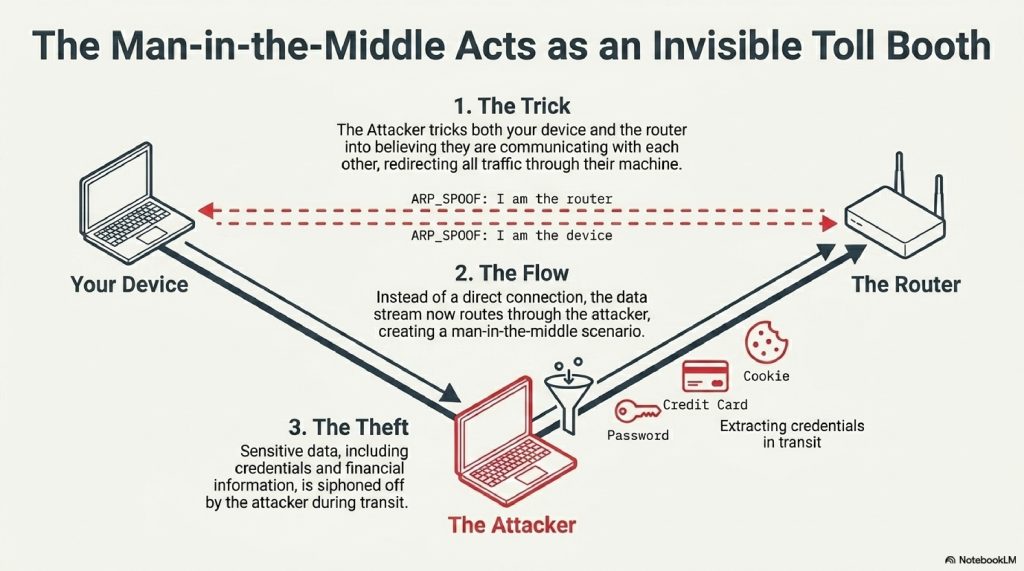
Technical Note: This is often done using a process called ARP (Address Resolution Protocol) Poisoning. By corrupting the “map” your device uses to find the router, the hacker becomes the invisible toll booth for your data.
4. The Evil Twin: When Your Phone Lies to You
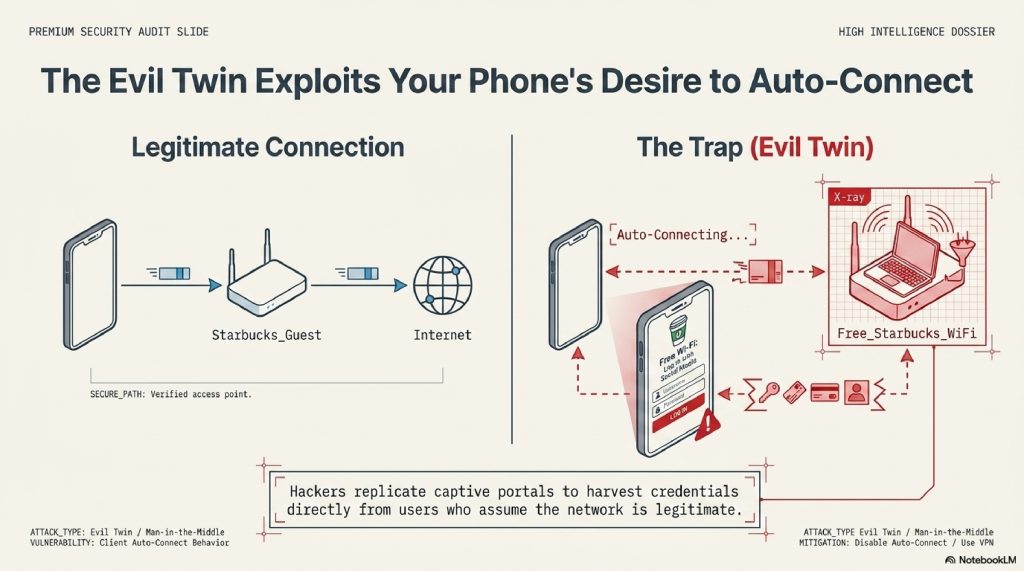
This is perhaps the most devious trick in the book. You enter a Starbucks and see two networks: Starbucks_Guest and Free_Starbucks_WiFi. Which one do you pick?
The second one might be an Evil Twin.
An Evil Twin is a fraudulent Wi-Fi access point that appears to be legitimate but is actually set up by a hacker using a device like a WiFi Pineapple.
Why it works:
- Auto-Connect: Our phones are programmed to remember networks. If you’ve connected to a network named “Airport_Free” before, your phone will constantly search for it. A hacker can set up a fake “Airport_Free” network, and your phone might connect to it automatically without you even taking it out of your pocket.
- The Captive Portal: The hacker can create a fake login page that looks identical to the real one, asking for your email or even a “social media login” to gain access. Once you “log in,” they have your credentials.
5. Packet Sniffing: Reading the Airwaves
If a MITM attack is like a toll booth, packet sniffing is like a high-powered telescope.
Information on the internet is broken down into small chunks called packets. Packet sniffing involves using software (like Wireshark) to capture these packets as they fly through the air.
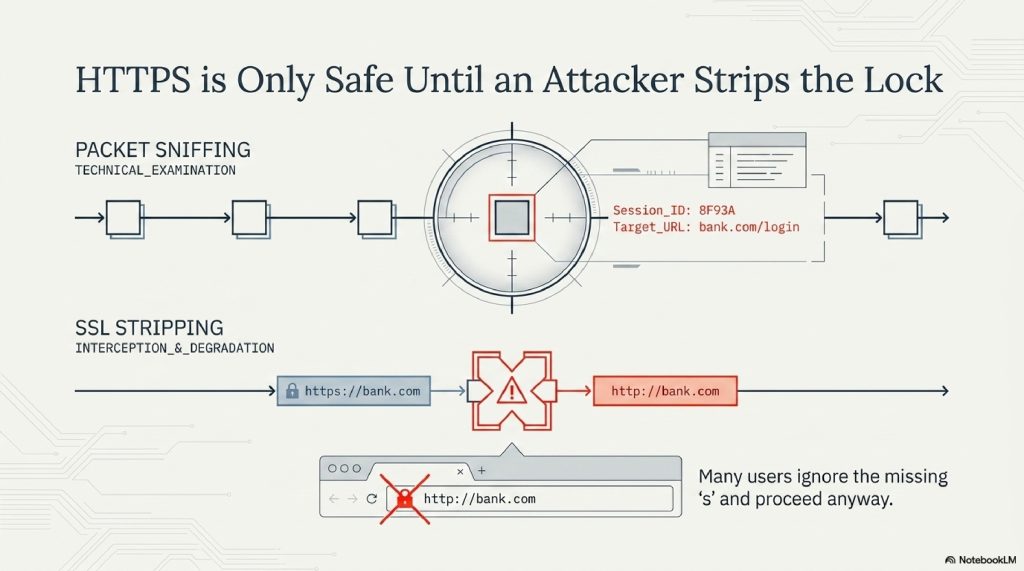
If the network isn’t encrypted, a hacker can reconstruct your entire web session from these packets. They can see:
- What websites you are visiting.
- The text of your unencrypted messages.
- Your “Session IDs” which could allow them to “log in” as you on a site without ever needing your password.
6. The HTTPS Myth: Is It Enough?
“But I only visit sites with the little padlock icon!”
You’ve likely been told that HTTPS (Hypertext Transfer Protocol Secure) makes you safe. While it is a massive improvement, it is not a silver bullet against a determined attacker on public Wi-Fi.
The SSL Stripping Attack
A clever hacker can use a technique called SSL Stripping. They intercept your request to a secure site (like [https://bank.com](https://bank.com)) and downgrade it to an unencrypted version ([http://bank.com](http://bank.com)). Your browser might not show the padlock, but many users don’t notice the missing “s” and proceed anyway.
7. How to Protect Yourself: The Digital Armor
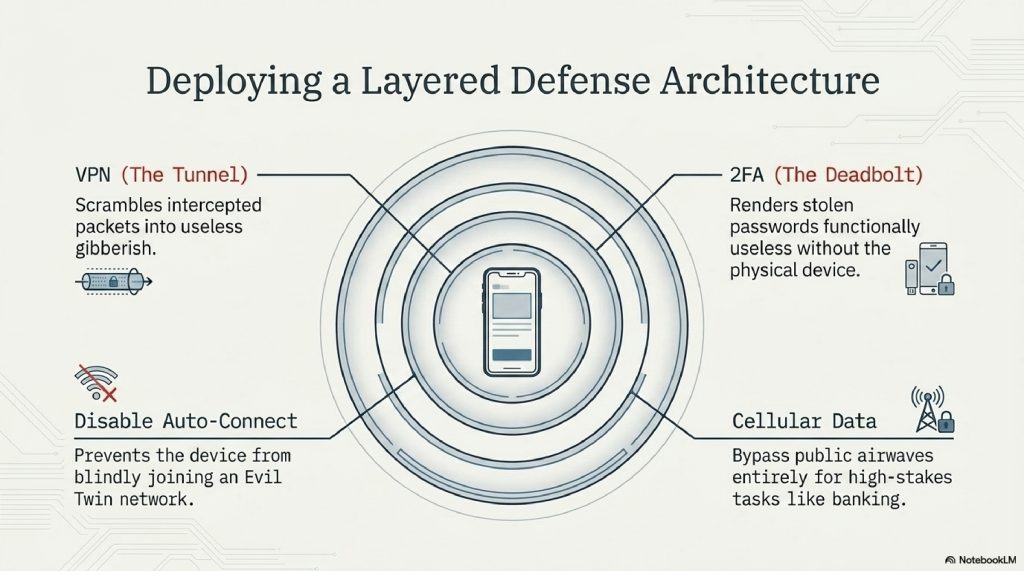
Knowing the dangers is half the battle. The other half is logistics. Here is your checklist for staying safe in public:
A. Use a VPN (Virtual Private Network)
A VPN is the single most important tool in your arsenal. It creates an encrypted tunnel for your data. Even if a hacker intercepts your “packets,” all they will see is gibberish.
B. Disable “Auto-Connect”
Go into your phone’s Wi-Fi settings and tell it not to automatically join known networks. This prevents your phone from accidentally hopping onto an “Evil Twin.”
C. Use Two-Factor Authentication (2FA)
If a hacker does manage to steal your password, 2FA acts as the final deadbolt. They can’t get into your account without the physical code sent to your phone.
D. Stick to Cellular Data
If you need to do something sensitive like banking or accessing medical records, turn off Wi-Fi and use your 5G/LTE connection. Cellular networks are significantly harder to spoof or intercept than public Wi-Fi.
8. The Future of Wi-Fi Security: WPA3 and Beyond
The industry isn’t sitting still. The new standard, WPA3, includes a feature called Opportunistic Wireless Encryption (OWE).
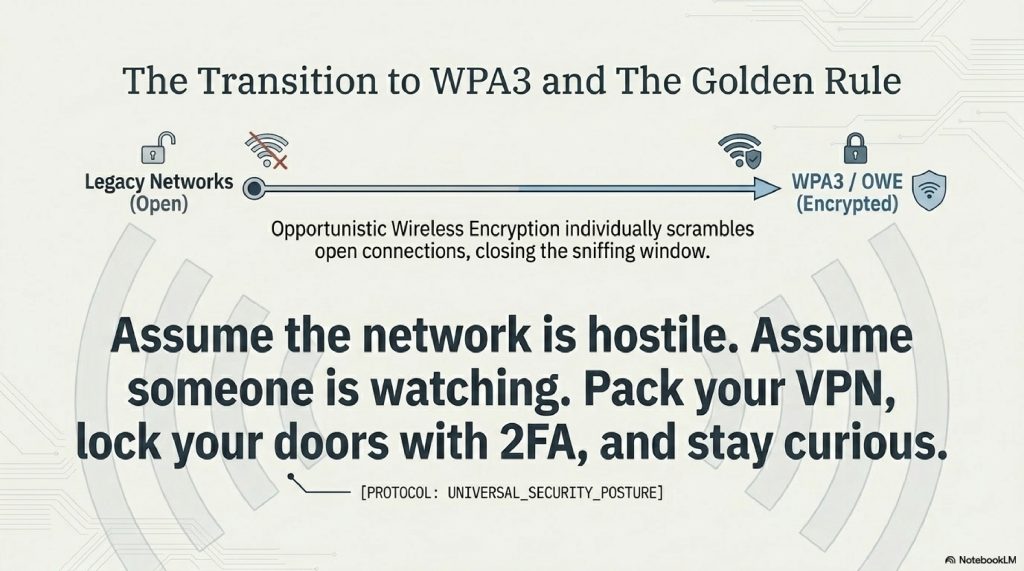
In the past, “Open” Wi-Fi meant “No Encryption.” With OWE, even if a network doesn’t have a password, the connection between your device and the router is still individually encrypted. As WPA3 becomes the standard in airports and hotels, the “Golden Age” for simple packet sniffing will slowly come to an end.
9. Interesting Facts About Wi-Fi
- Wi-Fi doesn’t stand for anything: Contrary to popular belief, it is not short for “Wireless Fidelity.” It was a marketing term created by a branding firm because “IEEE 802.11b Direct Sequence” was too boring.
- The 10-Second Rule: A sophisticated hacker can set up a “Man-in-the-Middle” attack in less than 60 seconds using automated scripts.
- The Origin: Some of the core technology behind Wi-Fi was co-invented by Hollywood actress Hedy Lamarr during WWII as a way to prevent torpedo signals from being jammed.
- Your MAC address is a fingerprint: Even if you don’t connect to a Wi-Fi network, your phone “probes” for them, broadcasting its unique MAC address. Retail stores use this to track your movement through the aisles.
FAQs
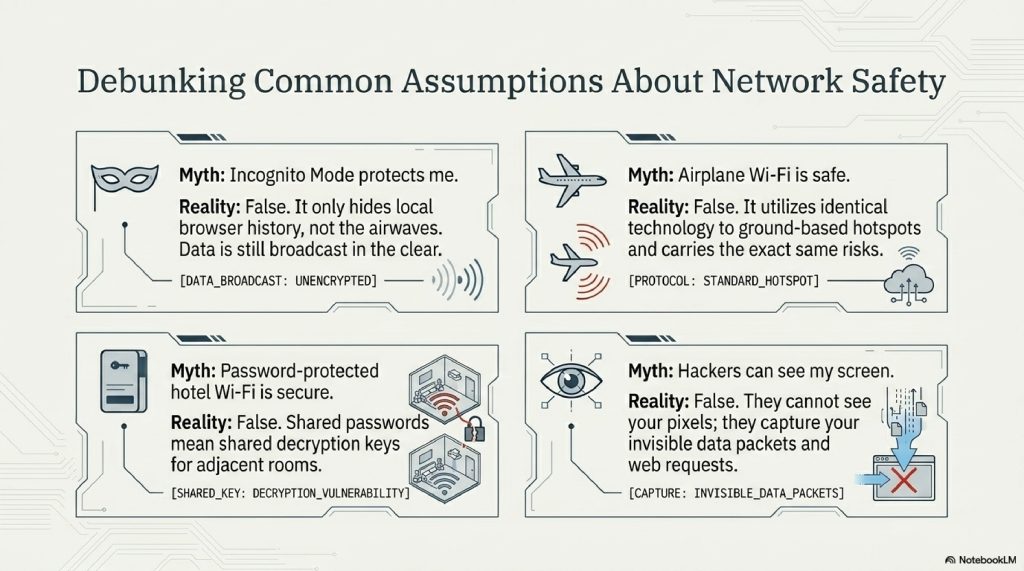
1. Can hackers see my screen on public Wi-Fi? No, they typically cannot see your actual screen. However, they can see the data you are sending/receiving and what websites you are visiting.
2. Is using a password-protected hotel Wi-Fi safe? It is safer than a completely open network, but because the password is given to all guests, a hacker staying in the room next door can still use that password to decrypt your traffic.
3. Does “Incognito Mode” protect me? No. Incognito mode only prevents your browser from saving your history locally. It does nothing to protect your data as it travels through the air.
4. Can I get a virus just by connecting to public Wi-Fi? It is rare, but possible through a “worm” that spreads across a network by exploiting unpatched software vulnerabilities on your device.
5. Is the Wi-Fi on an airplane safe? In-flight Wi-Fi uses similar technology to ground-based hotspots and carries many of the same risks. Always use a VPN.
6. Can hackers steal my photos from my phone via Wi-Fi? If you have “File Sharing” or “AirDrop” set to “Everyone,” or if you are using an unencrypted backup service, it is possible for an attacker to access files.
7. Is a VPN 100% foolproof? Nothing is 100%, but a high-quality VPN makes it exponentially harder for a Wi-Fi hacker to see anything useful.
8. Are iPhone users safer than Android users? Both are susceptible to Wi-Fi attacks. Security depends more on your habits (using VPNs, 2FA) than the operating system.
9. What should I do if I think I’ve been hacked? Disconnect immediately, change your passwords from a secure network, and enable 2FA on all accounts.
10. Is “Free Wi-Fi” ever truly safe? Only if you treat it as a hostile environment. If you assume someone is watching and use a VPN, you can use it safely.
OTHER USEFUL BLOG SUGGESTIONS
- How Hackers Steal Passwords Without You Realizing
- How Websites Track You Across the Internet (Explained Simply)
- How Does Wi-Fi Work? The Simple Science of Wireless Data
- How Do Mobile Towers Work? The Science of Cellular Networks
- How Do VPNs Work? The Complete Guide to Virtual Private Networks
CONCLUSION
The next time you’re tempted by the siren song of a “Free Wi-Fi” sign, remember: the internet is not a series of private pipes, but a vast, shared ocean of radio waves. When you jump into that ocean without protection, you are visible to anyone willing to look.
Public Wi-Fi is a miracle of modern convenience, but it is built on a foundation of trust that no longer exists in the digital age. By understanding the mechanics of Man-in-the-Middle attacks and the deceptive nature of Evil Twins, you transition from a “target” to an “informed user.”
Pack your digital bags with a VPN, lock your doors with 2FA, and stay curious. The invisible world around you is fascinating, just make sure you aren’t the one being watched.
Comment