INTRODUCTION
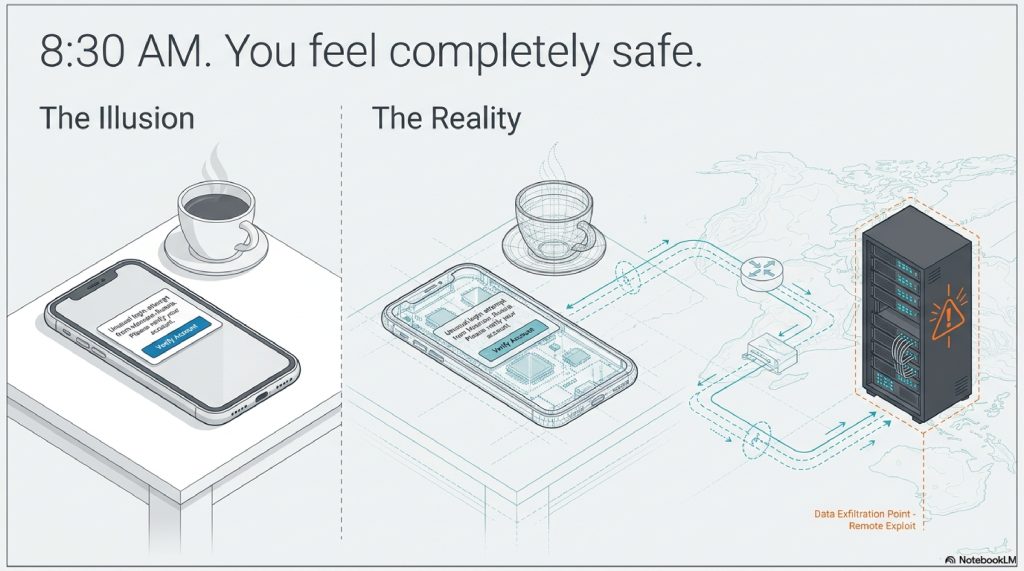
It is 8:30 AM on a Tuesday. You are sitting at a coffee shop, sipping a latte, scrolling through your morning emails.
An alert pops up on your phone: “Unusual login attempt from Moscow, Russia. Please verify your account.” There is a helpful link right below the message. You tap it, enter your email and password, and sigh in relief when the screen tells you your account is secured. You lock your phone, grab your coffee, and head to work.
You feel safe. But in reality, someone 5,000 miles away just took complete control of your digital life.
When most of us picture a hacker, Hollywood has trained us to imagine a shadowy figure in a dark basement, furiously typing lines of glowing green code, violently “breaking” through a firewall to guess our passwords. We imagine it as a digital home invasion, a broken window, a kicked-in door.
The truth is far more terrifying, yet brilliantly simple.
Modern hackers do not break the door down. They simply ask you for the keys, and you willingly hand them over. Or worse, they bypass the lock entirely by stealing the mathematical “shadow” of your password from a server you forgot you signed up for in 2016.
Every single day, billions of passwords are stolen, traded, and exploited without a single line of Hollywood-style code being written. The modern cybercriminal operates less like a brute-force burglar and more like an elite illusionist. They manipulate human psychology, exploit invisible browser cookies, and weaponize massive databases of leaked data.
If you have ever wondered how a seemingly secure account gets compromised overnight, or why having a “complex” password with symbols and numbers isn’t enough anymore, you are in the right place.
We are going to pull back the curtain on the invisible world of credential theft. We will decode the silent mechanics of how your passwords are stolen, why two-factor authentication isn’t bulletproof, and the astonishing math hackers use to crack passwords in milliseconds.
Let’s enter the mind of the machine.
TABLE OF CONTENTS
- The Simple Explanation: The Digital Pickpocket
- Step-by-Step Breakdown: The Anatomy of a Modern Hack
- Real-World Example: The “Urgent Invoice” Trap
- The Advanced Technical Layer: Hashes, Salts, and Cookies
- Common Myths About Password Security
- The Future: AI Phishing and the Death of the Password
- 10 Terrifying (But True) Facts About Passwords
- Frequently Asked Questions (FAQs)
A. THE SIMPLE EXPLANATION: The Digital Pickpocket
Think of your password like a physical house key.
If a burglar wants into your house, they have two options. Option one: spend hours picking the lock, risking setting off alarms and getting caught. This is hard, loud, and inefficient.
Option two: build an exact replica of your front door in the middle of the street. Then, they put up a sign that says, “Your house has been moved here for safety.” When you walk up and put your key into this fake door, they quickly scan the ridges of your key, hand it back to you, and say, “Oops, wrong door!”
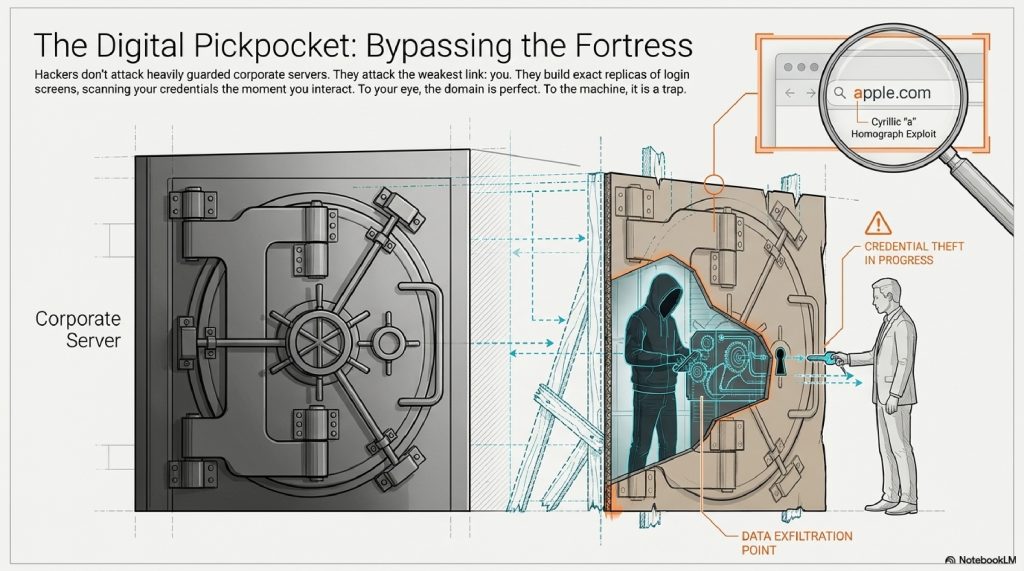
You go home, unaware that the thief now holds a perfect copy of your key.
This is exactly how Phishing works. Hackers don’t attack the heavily guarded servers of Google or your bank. Those servers are digital fortresses. Instead, they attack the weakest link in the security chain: you. They build perfect replicas of login screens and trick you into typing your password into their database instead of the real one.
[Visual Suggestion: An illustration showing a user holding a glowing key, walking toward two identical doors. One door has a bank logo, the other is a cardboard cutout with a hacker hiding behind it holding a key-copying machine.]
B. STEP-BY-STEP BREAKDOWN: The Anatomy of a Modern Hack
But wait, what if you have Two-Factor Authentication (2FA)? What if you get a text message with a 6-digit code every time you log in?
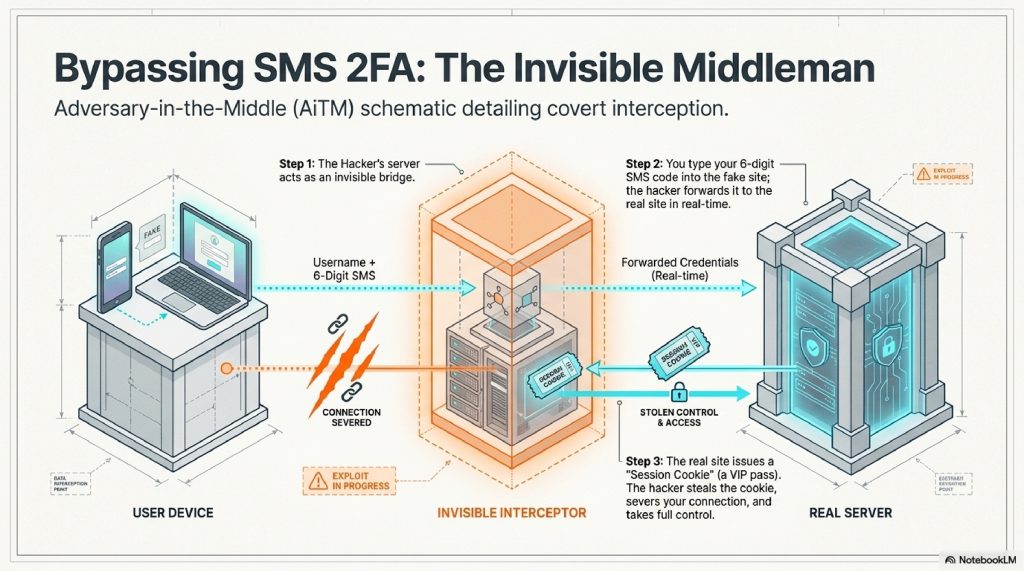
Hackers have solved this using a terrifying method called an Adversary-in-the-Middle (AiTM) attack. Here is exactly what happens behind the scenes:
- Step 1: The Bait. You receive an email that creates a sense of panic or urgency (e.g., “Your Amazon account has been locked”). You click the link.
- Step 2: The Invisible Middleman. The link takes you to a fake website controlled by the hacker. But here is the trick: the hacker’s server acts as an invisible bridge. When you type your username, the hacker’s server instantly types it into the real Amazon website in real-time.
- Step 3: The 2FA Bypass. The real Amazon site triggers a 6-digit text message to your phone. You look at your phone and type the 6 digits into the fake website. The hacker’s server instantly forwards those digits to the real Amazon site.
- Step 4: The Golden Cookie. Amazon accepts the code and logs the hacker’s server in. Amazon generates a “Session Cookie” (a digital VIP pass that keeps you logged in). The hacker steals this cookie, disconnects you, and leaves you looking at an error page.
The hacker now has full access to your account, and they never even needed to know your actual password.
C. REAL-WORLD EXAMPLES: The “Urgent Invoice” Trap
Let’s look at how this plays out in the real world.
Imagine you are an employee at a mid-sized company. It’s Friday at 4:45 PM. You get an email from your CEO: “I need this invoice paid before the weekend, please review the attached document immediately.”
The link goes to a Microsoft 365 login page. The URL looks slightly weird (microsoft-login-secure-portal.com), but the logo is right, the colors are right, and you are in a rush. You type your password.
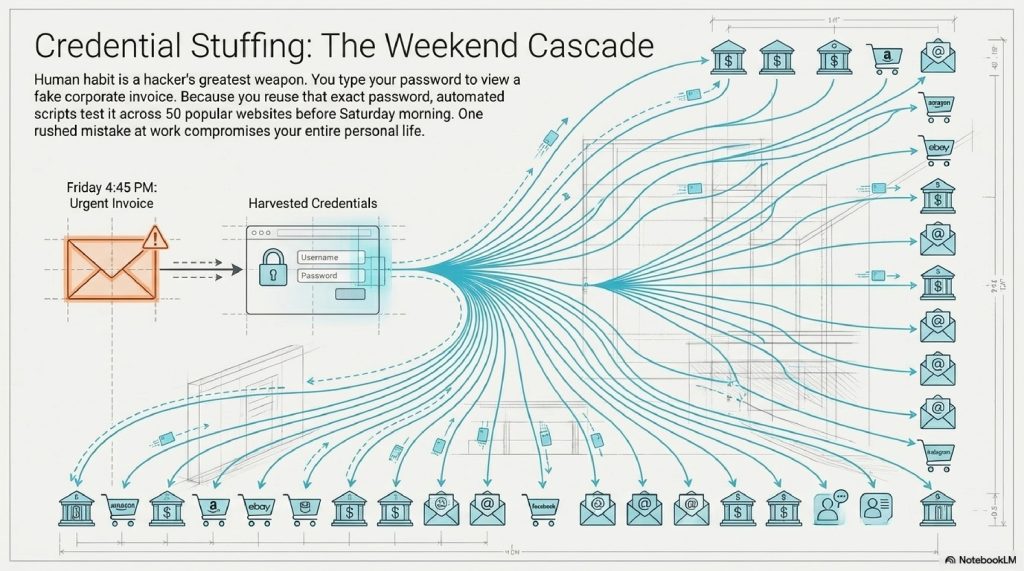
The page refreshes and says “Document no longer available.” You shrug and go home for the weekend.
Meanwhile, the hacker has harvested your credentials. Because human beings are creatures of habit, they know you likely use that exact same password for your personal email, your banking app, and your Amazon account. By Saturday morning, an automated script (a bot) has tested that single stolen password across 50 different popular websites. This is called Credential Stuffing, and it is how one mistake at work compromises your entire personal life.
D. ADVANCED TECHNICAL LAYER: Hashes, Salts, and Cookies
Let’s dive a layer deeper. What happens when hackers actually do steal passwords directly from a company’s database?
When a company like LinkedIn or Yahoo gets breached, the hackers download a database of passwords. But if the company is doing its job right, they don’t store your password in “plaintext” (e.g., hunter2). They store a Hash.
The Meat Grinder Analogy (Hashing)
A hashing algorithm is a mathematical one-way street. Think of it like a meat grinder. If your password is a steak, the algorithm grinds it into a completely unrecognizable string of characters (e.g., e80b5017098950fc58aad83c8c14978e).
You can put a steak into a grinder to get ground beef, but no matter how hard you try, you cannot reverse the process to turn ground beef back into a steak.
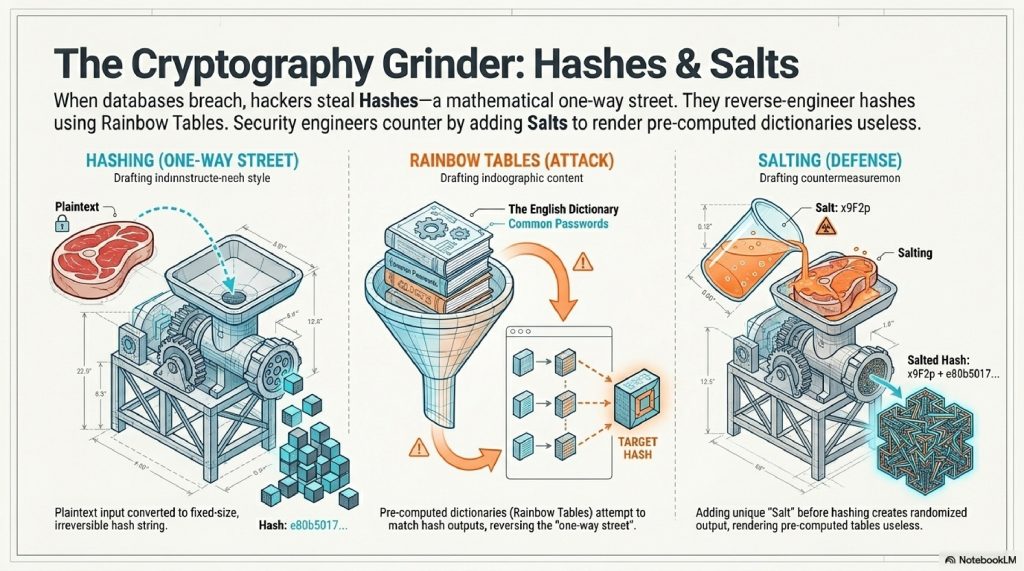
So, how do hackers steal your password if it’s a hash? They use Rainbow Tables. Since they know the algorithm used to grind the meat, they simply take the entire English dictionary, grind every single word into a hash, and compare their list of hashes to the stolen list. If they match, they know your password.
To combat this, security engineers use Salts. A “salt” is a random string of characters added to your password before it gets ground up (e.g., hunter2 + x9F2p). This changes the resulting hash completely, making the hacker’s dictionary of pre-computed hashes totally useless.
[Visual Suggestion: An infographic showing a steak (Password) entering a mechanical grinder (Hashing Algorithm) and coming out as ground beef (Hash). A second panel shows a shaker of salt being poured on the steak before grinding, resulting in a completely different color of ground beef.]
E. COMMON MYTHS ABOUT PASSWORD THEFT
- Myth 1: “I would spot a fake website immediately.” Reality: Hackers use Homograph Attacks. They register domain names using characters from different alphabets that look identical to English letters. For example, replacing a lowercase “a” with the Cyrillic “а”. To your human eye,
apple.comlooks perfectly normal. To your browser, it is a completely different website. - Myth 2: “My password is too complex to guess.” Reality: Complex passwords (
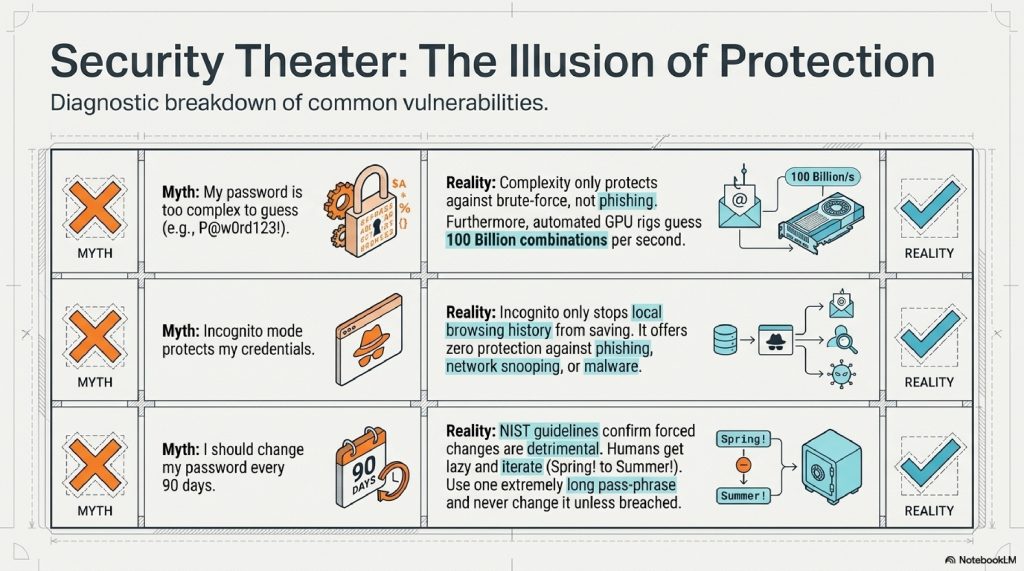
P@$$w0rd123!) don’t matter if you type them into a fake website. Furthermore, automated cracking rigs using high-end graphics cards (GPUs) can guess 100 billion password combinations per second. Complexity only protects against brute-force, not theft. - Myth 3: “Incognito mode protects my passwords.” Reality: Incognito mode simply stops your browser from saving your history locally on your machine. It offers absolutely zero protection against phishing, malware, or network snooping.
F. THE FUTURE OF THE TECHNOLOGY
The cat-and-mouse game of cybersecurity is evolving at a terrifying pace.
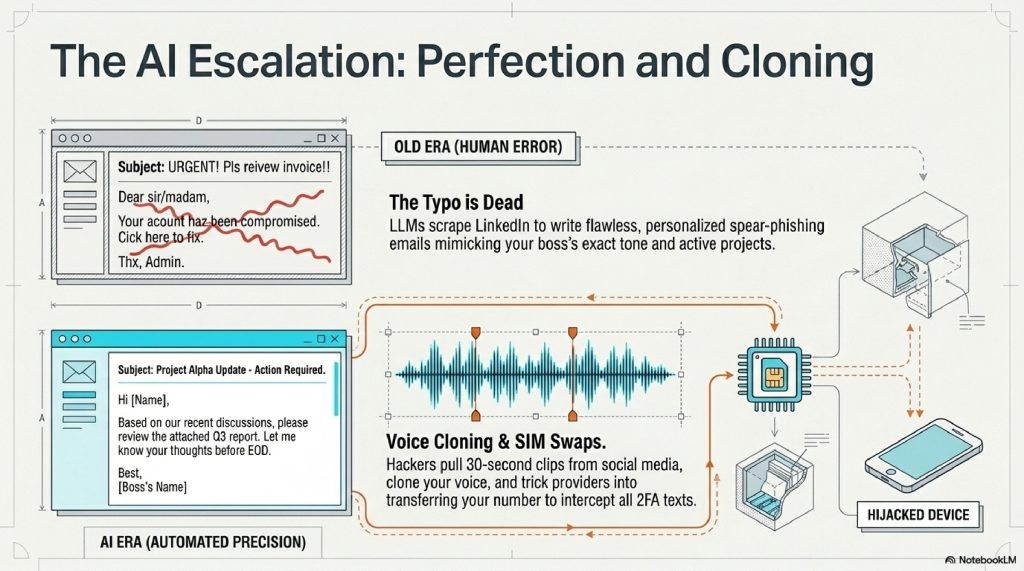
1. AI-Driven Spear Phishing Historically, you could spot a phishing email because of poor grammar or spelling mistakes. Today, hackers use Large Language Models (like ChatGPT) to write flawless, highly personalized emails. They can scrape your LinkedIn profile and generate an email that sounds exactly like your specific boss, referencing projects you are actively working on.
2. Deepfake Voice Cloning Hackers are now downloading 30-second clips of voices from TikTok or YouTube and using AI to clone them. They call your cell phone company, using your voice, and convince the customer service rep to transfer your phone number to the hacker’s SIM card. Once they have your phone number, they intercept all your 2FA text messages.
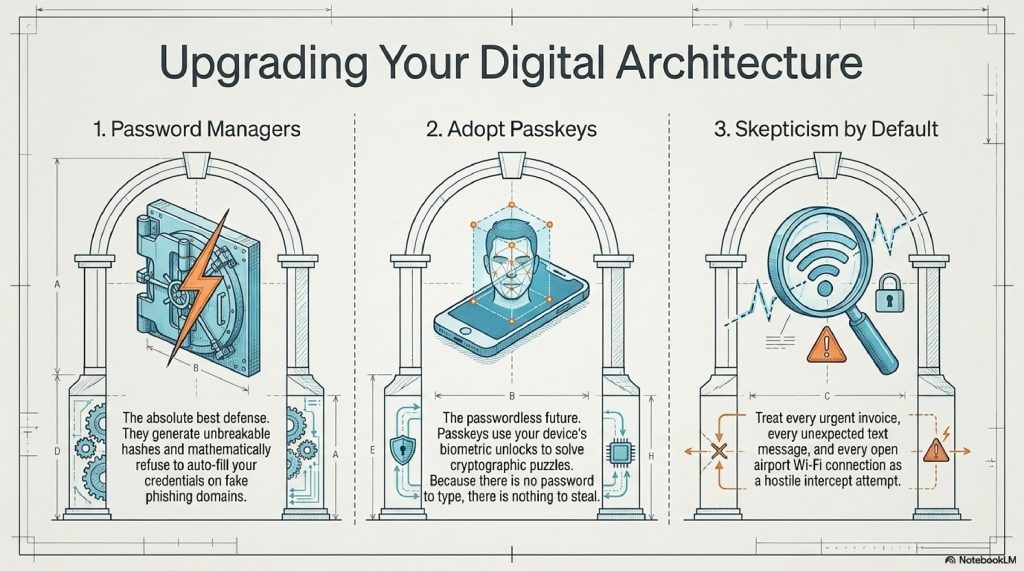
3. The Good News: Passkeys The future isn’t entirely bleak. The tech industry is actively trying to kill the password forever using Passkeys. Instead of typing a password, your device uses cryptography. When a website asks you to log in, it sends a mathematical puzzle to your phone. Your phone uses your FaceID or fingerprint to unlock a private key, solves the puzzle, and logs you in. Because there is no password to type, there is no password to steal. Phishing becomes mathematically impossible.
G. 10 TERRIFYING (BUT TRUE) FACTS ABOUT PASSWORDS
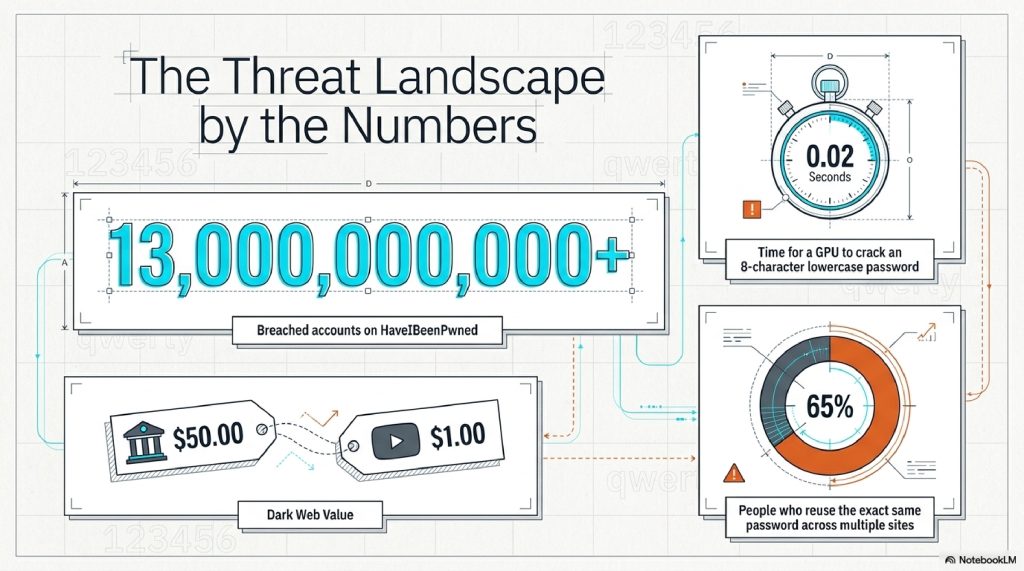
- The Scale of Theft: The website HaveIBeenPwned currently tracks over 13 billion compromised accounts from data breaches.
- The Speed of Cracking: An 8-character password using only lowercase letters can be cracked by a modern hacker’s computer in exactly 0.02 seconds.
- The Cost of Convenience: Nearly 65% of people reuse the same password across multiple sites, meaning one breached forum in 2014 can compromise a bank account in 2024.
- The “123456” Epidemic: Year after year, “123456”, “password”, and “qwerty” remain the most common passwords found in data breaches.
- Keyloggers: Some malware doesn’t guess passwords; it just records every single keystroke you make on your keyboard and silently emails the log to the hacker.
- Dark Web Markets: A stolen login for a bank account can sell for over $50 on the dark web, while a stolen Netflix account goes for less than $1.
- Clipboard Hijacking: Advanced malware can monitor your computer’s “copy and paste” clipboard. If you copy a password from your password manager, the malware silently swaps it out.
- Wi-Fi Snooping: If you log into an unencrypted website (HTTP instead of HTTPS) on public airport Wi-Fi, anyone sitting in the terminal with a $20 Wi-Fi antenna can pluck your password right out of the air.
- The Human Element: Social engineering is so effective that in professional penetration tests, hackers often get passwords simply by calling the front desk, pretending to be IT, and asking for them.
- The Memory Limit: The average person has around 100 online accounts. It is biologically impossible for a human brain to remember 100 unique, complex 16-character passwords.
FAQ SECTION
1. How do I know if my password has been stolen? You can visit a trusted, free service like HaveIBeenPwned.com. You enter your email address, and it safely checks it against a database of known, publicly leaked data breaches.
2. Are Password Managers safe? Yes. Password managers (like Bitwarden, 1Password, or Apple Keychain) are the absolute best defense against password theft. They generate unbreakable passwords and auto-fill them. If you visit a fake phishing site, the password manager won’t auto-fill because it recognizes the URL is wrong, saving you from getting hacked.
3. Is SMS Two-Factor Authentication (2FA) enough? It is better than nothing, but it is the weakest form of 2FA because text messages can be intercepted via SIM-swapping. You should upgrade to an Authenticator App (like Google Authenticator or Authy) or a hardware security key (like a YubiKey).
4. Can hackers steal passwords from my phone? Yes. While mobile operating systems are relatively secure, if you download malicious apps (especially outside official app stores) or click malicious links in text messages (“Smishing”), your credentials can be stolen.
5. What is a “Dictionary Attack”? It is an automated method where a hacker uses a script to rapidly guess your password by trying every single word in the dictionary, often followed by common numbers (e.g., Password1, Password2).
6. Why does my web browser warn me about “HTTP”? HTTP means the connection between you and the website is unencrypted. If you type a password on an HTTP site, it travels across the internet as plain, readable text. Always look for HTTPS (the padlock icon), which encrypts the data in transit.
7. Should I change my passwords every 90 days? Actually, no. The National Institute of Standards and Technology (NIST) recently updated their guidelines to say forced password changes are bad. Why? Because humans get lazy and just change Spring2023! to Summer2023!. It is better to have one incredibly long, complex password that you never change (unless breached).
8. What should I do immediately if I clicked a phishing link? Disconnect from the internet immediately. Use a different, safe device to log into the compromised account and change the password. Turn on 2FA if it isn’t already. Check your account settings to ensure the hacker didn’t set up “email forwarding rules” to spy on your future emails.
9. Can a VPN protect my passwords? A VPN encrypts your internet traffic, preventing people on the same Wi-Fi network from spying on your connection. However, if you voluntarily type your password into a fake phishing website, a VPN will not protect you.
10. What is the difference between phishing and malware? Phishing is a psychological trick to make you hand over your password voluntarily. Malware is malicious software installed on your computer without your knowledge that forcefully steals your data (like a keylogger).
INTERNAL LINK SUGGESTIONS
- How Google Search Actually Ranks Websites in 2026
- How Websites Track You Across the Internet (Explained Simply)
- How Weather Satellites Predict Storms: The Science of Space Forecasting
CONCLUSION
The era of the “hacker in a hoodie” violently smashing through digital firewalls is over. The modern cybercriminal is a psychological architect, designing invisible traps that exploit our rushing, our distraction, and our inherent trust in the glowing screens we hold in our hands.
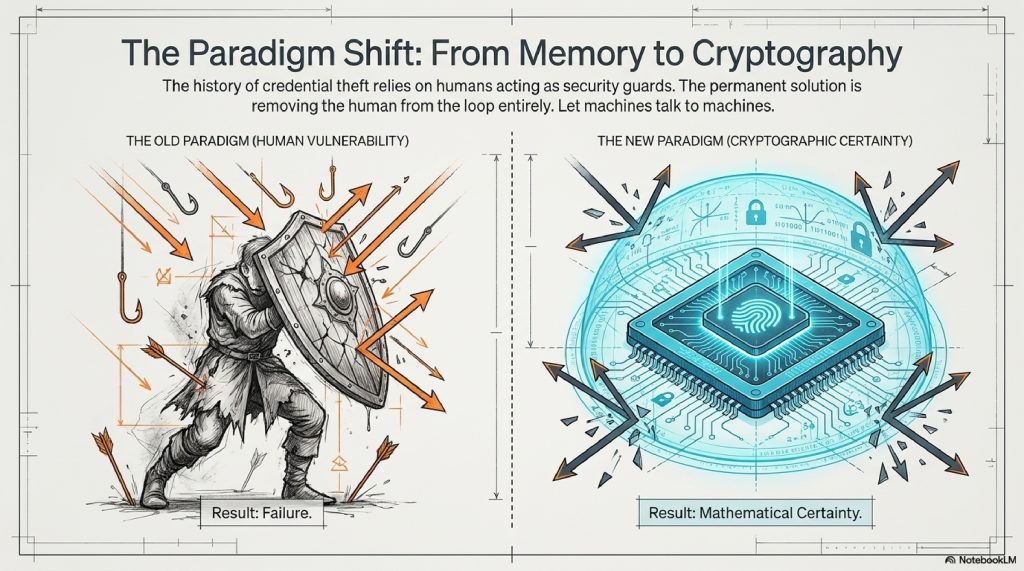
When we understand how passwords are stolen, not through brute force, but through cleverly disguised phishing pages, invisible session cookies, and massive data breaches, the internet transforms from a mysterious black box into a navigable landscape. You realize that you don’t need a degree in computer science to protect yourself; you just need to change your habits.
Stop relying on human memory to store passwords. Embrace password managers. Switch to authenticator apps. And above all, treat every urgent email, every unexpected text message, and every login prompt with a healthy dose of skepticism.
The lock on the front door of your digital life is only as strong as the person holding the key. Keep it safe, keep it complex, and never hand it over to a stranger in the dark.
Comments (2)