INTRODUCTION
You know the feeling.
You are sitting on your couch, browsing the web on your phone. You briefly search for a pair of blue running shoes. You click on a website, scroll for ten seconds, decide they are too expensive, and close the tab. You don’t create an account. You don’t add them to your cart. You simply look and leave.
Ten minutes later, you open a completely different app to read the news. There, sitting perfectly in the middle of a news article, is an advertisement for those exact same blue shoes. Later that evening, you open a social media app and there are the shoes again. By the end of the week, those blue sneakers are haunting you across every device you own, popping up in banners, sidebars, and video breaks.
It feels like magic. It feels like someone is standing right behind your shoulder. It feels, quite frankly, like your phone is listening to you.
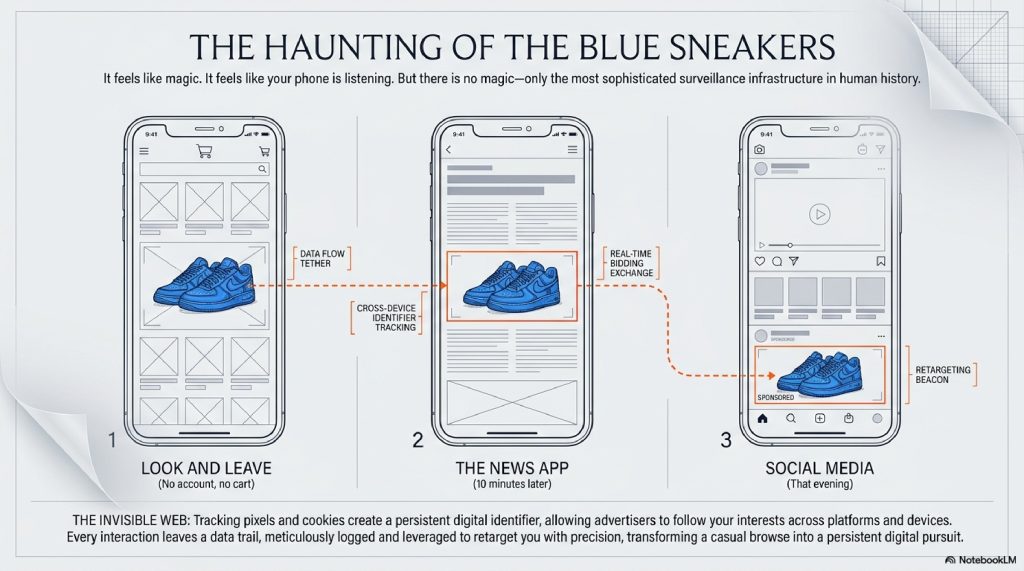
But there is no magic involved, and nobody is listening to your microphone. What you are experiencing is the result of the most sophisticated, invisible surveillance infrastructure ever constructed in human history.
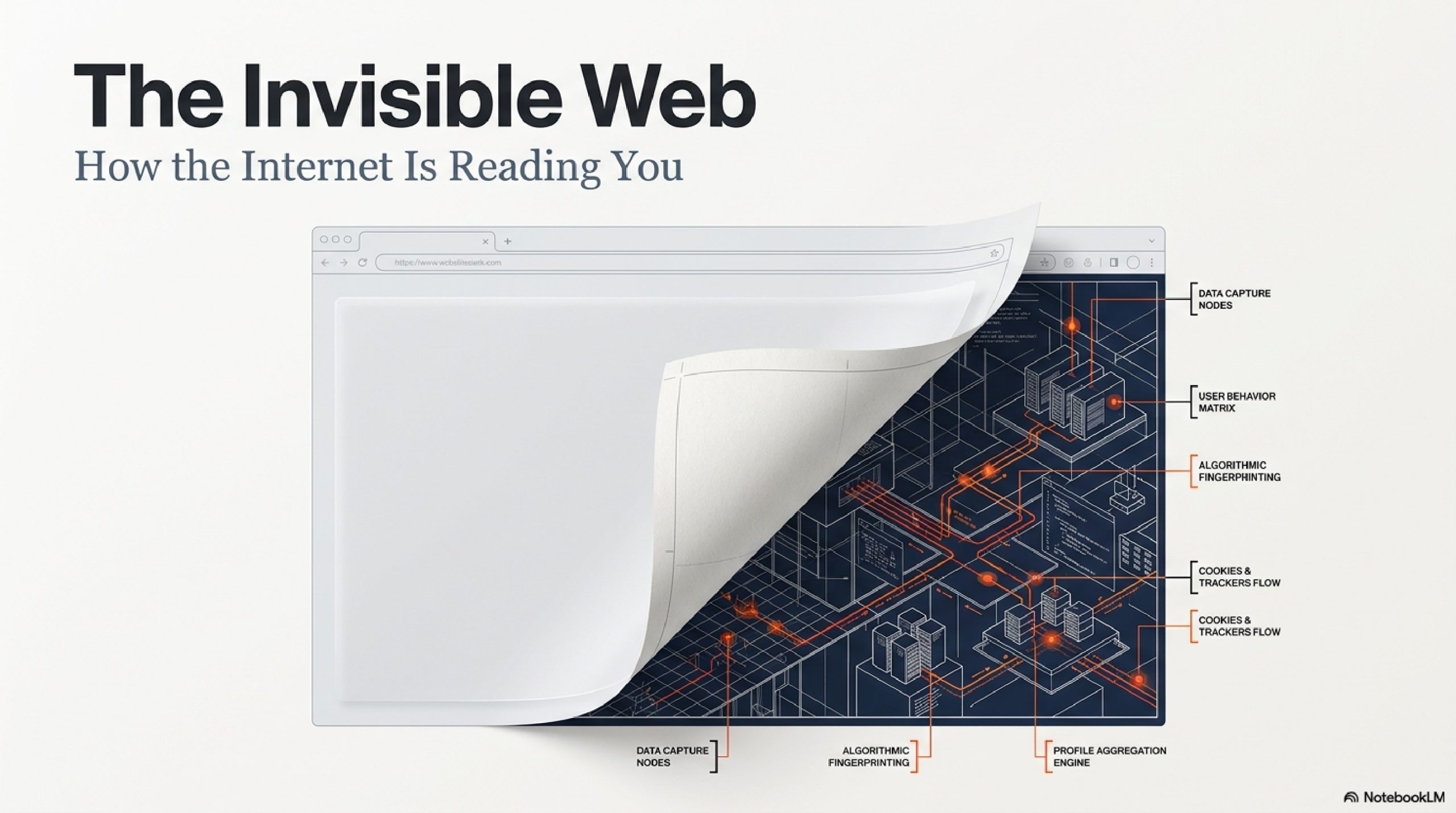
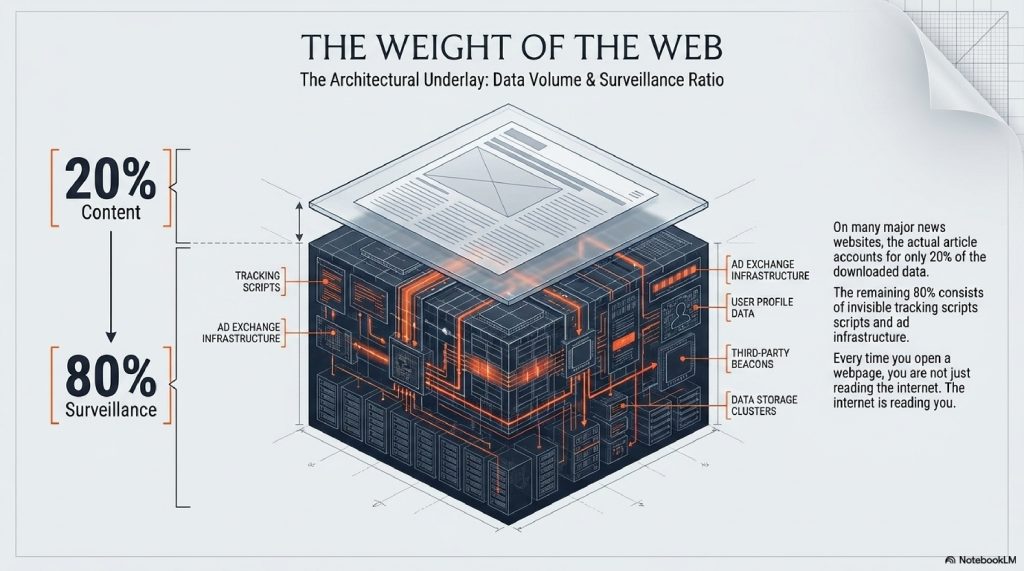
Every time you open a webpage, you are not just reading the internet. The internet is reading you.
Behind the text, the videos, and the colorful buttons, millions of invisible trackers are engaging in a high-speed, silent conversation about who you are, what you desire, and how much your attention is worth. In the few milliseconds it takes for a website to load, your digital profile is scanned, packaged, and auctioned off to the highest bidder.
We casually click “Accept All Cookies” multiple times a day to make annoying pop-ups go away, but almost no one understands the vast mechanical ecosystem they are agreeing to.
How does a news website know what you looked at on a shoe store’s website? How do companies track you even when you use “Incognito Mode”? And what exactly is a “Tracking Pixel”?
In this deep dive, we are going to rip the mask off the modern internet. We will explore the hidden codes that follow you, the digital fingerprints you unknowingly leave behind, and the massive, billion-dollar stock market that trades exclusively in human attention.
Welcome to the invisible web. Let’s find out how it’s watching you.
TABLE OF CONTENTS
- The Big Picture: The “Invisible Sticky Note” Analogy
- The Foundation: First-Party vs. Third-Party Cookies
- The Silent Watcher: How Tracking Pixels Work
- Step-by-Step: The Journey of a Tracked Click
- The Advanced Layer: Browser Fingerprinting
- Real-Time Bidding (RTB): The Stock Market of You
- Common Myths About Internet Tracking
- Fascinating Facts You Didn’t Know
- The Future: The Death of the Cookie & AI Tracking
- Frequently Asked Questions (FAQs)
The Big Picture: The “Invisible Sticky Note” Analogy
To understand internet tracking, you have to realize that the internet is inherently forgetful.
When the World Wide Web was invented, it was designed to be “stateless.” That means every time you click a link or refresh a page, the website completely forgets who you are. If you add an item to a digital shopping cart and then click to the checkout page, the website would normally forget you put the item in the cart.
To fix this amnesia, engineers invented a workaround.
Imagine walking into a massive shopping mall. You walk into a clothing store. As you walk through the door, the greeter slaps an invisible sticky note on your back. Written on that note is a random ID number: Customer #9872.
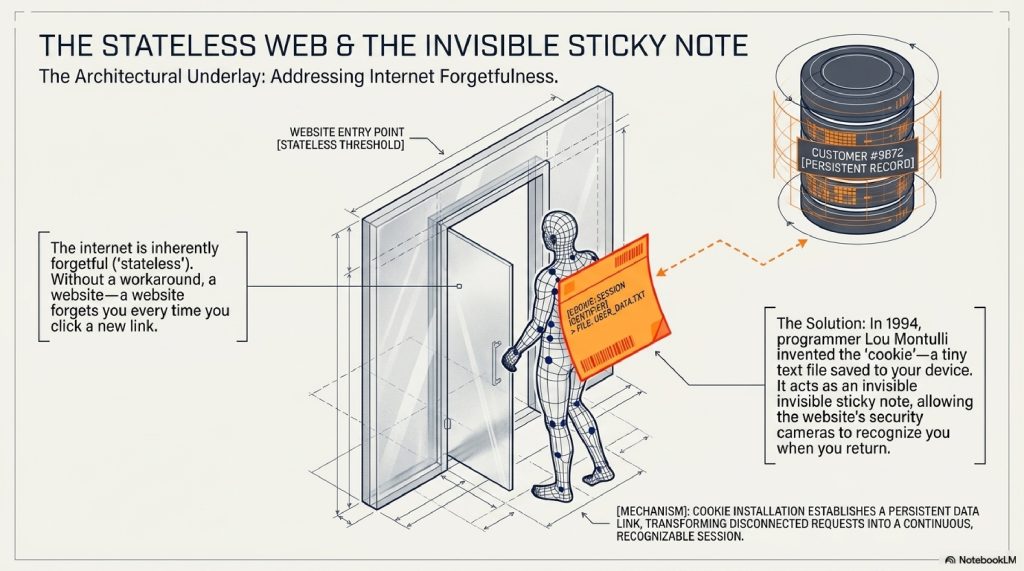
As you browse the store, the security cameras note that #9872 looked at blue shoes, picked up a red hat, and spent five minutes in the sock aisle. When you return to that store the next day, they see your sticky note, remember you are #9872, and immediately show you the blue shoes again.
This sticky note is an Internet Cookie. It is a tiny text file saved to your computer. On its own, it is harmless and deeply necessary. Without it, you would have to log into Netflix every time you clicked a new movie.
But tracking becomes creepy when the stores start sharing notes.
The Foundation: First-Party vs. Third-Party Cookies
Not all sticky notes are created equal. The tracking ecosystem is divided into two main camps.
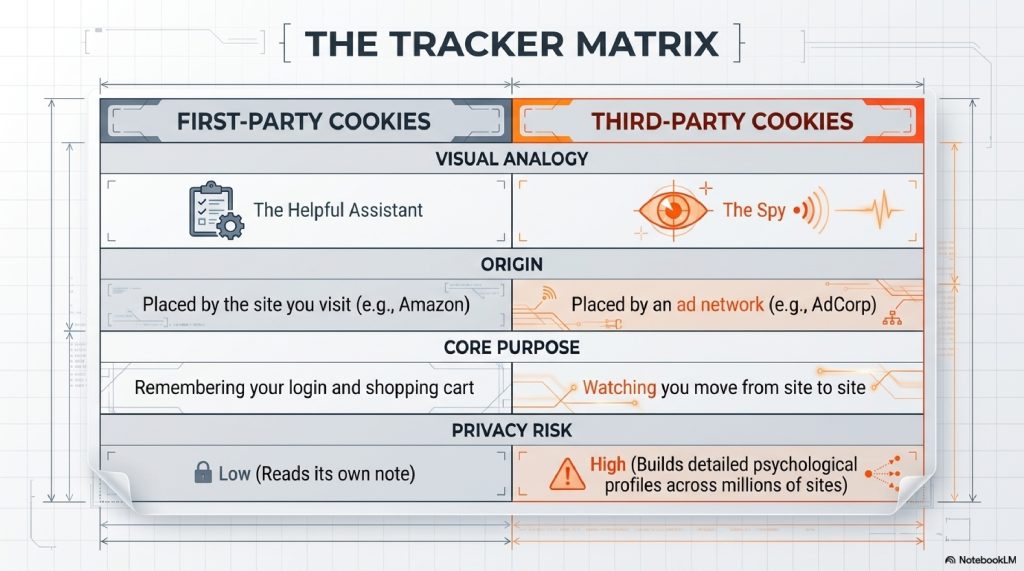
First-Party Cookies: The Helpful Assistant
When you visit amazon.com, Amazon puts a cookie on your browser. This cookie helps Amazon remember your login, your language preference, and what is in your cart. Amazon reads its own sticky note. This is a First-Party Cookie, and it is generally safe and helpful.
Third-Party Cookies: The Spies
Now imagine you visit a blog to read a recipe for chocolate chip cookies. The blog has advertising banners provided by an ad network (let’s call them Adsense).
When you load the recipe blog, Adsense also slips a sticky note onto your back.
Later, you visit a completely different website to check the weather. The weather site also uses Adsense to display ads. Adsense looks at your back, recognizes the sticky note they gave you on the recipe blog, and realizes: “Aha! The person checking the weather is the same person who likes baking chocolate chip cookies.”
This is a Third-Party Cookie. Because Adsense operates on millions of different websites, they can watch you move from site to site, building a massive, detailed psychological profile of your habits, fears, and desires.
The Silent Watcher: How Tracking Pixels Work
Cookies are stored in your browser. But what happens if you don’t click anything? What if you just open an email?
Enter the Tracking Pixel (also known as a Web Beacon).
A tracking pixel is a transparent image file. It is incredibly tiny, literally 1×1 pixel in size, the size of a microscopic speck of dust on your screen. You cannot see it.
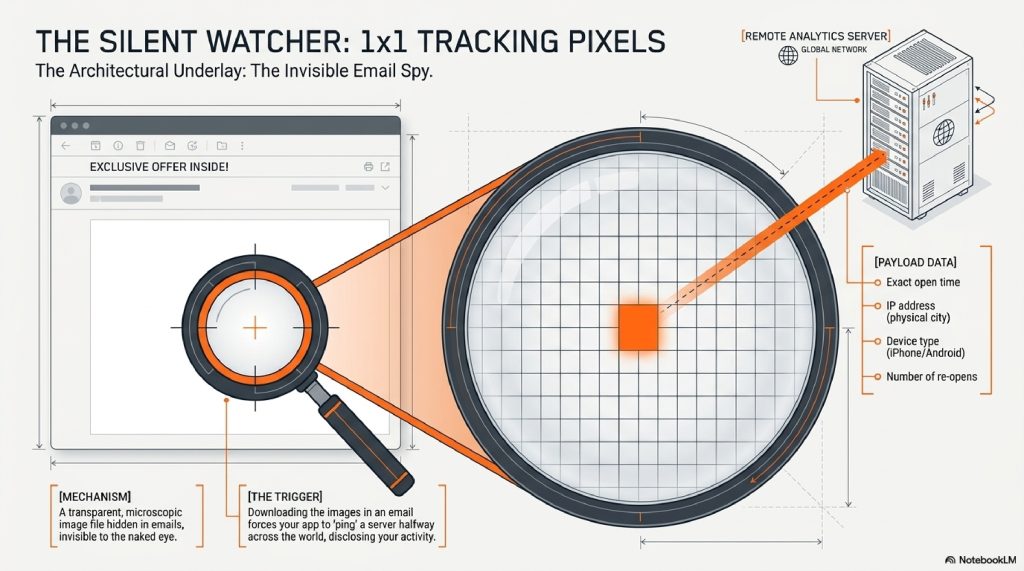
When you open a promotional email from a brand, your email app has to download the images inside it. When it downloads that invisible 1×1 pixel, it essentially “pings” a server halfway across the world.
That ping contains a treasure trove of data. It tells the company:
- The exact minute and second you opened the email.
- Your IP address (which reveals your physical city).
- What device you are using (iPhone vs. Android).
- How many times you reopened the email.
This is why, minutes after you read a brand’s email, you suddenly see an ad for them on Instagram. The pixel told them you were currently holding your phone and thinking about them.
[Visual Suggestion: A magnifying glass hovering over a blank white space in an email, revealing a glowing 1×1 dot that is beaming data up to a satellite or server.]
Step-by-Step: The Journey of a Tracked Click
Let’s slow down time and look at exactly what happens in the milliseconds after you look at a product online.

- Step 1: The Tag. You visit a website to look at a mountain bike. The website uses a tracking script (like the Meta Pixel or Google Analytics). It places a third-party cookie in your browser labeling you as an “Outdoor Enthusiast looking for Bikes.”
- Step 2: The Departure. You leave the site without buying. You go to read a news article on a major publication.
- Step 3: The Auction Trigger. As the news article loads, there is an empty square space on the page reserved for an ad. The news site sends a signal to an ad exchange saying, “I have a user here. Here is their cookie ID. Who wants to show them an ad?”
- Step 4: The Profile Match. The ad exchange reads your cookie. It broadcasts your profile to thousands of advertisers: “This user likes mountain bikes and lives in Chicago.”
- Step 5: The Bidding War. The mountain bike company’s automated software says, “We know that guy! He was just on our site! Bid $0.05 to show him a picture of the bike!” A camping company might bid $0.02.
- Step 6: The Delivery. The mountain bike company wins the auction. Their advertisement is beamed into the empty square on the news site.
You see the blue sneakers (or the mountain bike). And this entire 6-step process happened in less than 100 milliseconds faster than you can blink.
The Advanced Layer: Browser Fingerprinting
You might be thinking: “Simple. I’ll just clear my cookies and turn on Incognito Mode. Take that, trackers!”
Ten years ago, that would have worked. Today, the trackers have evolved. They don’t need to put a sticky note on your back anymore. They just take your Fingerprint.
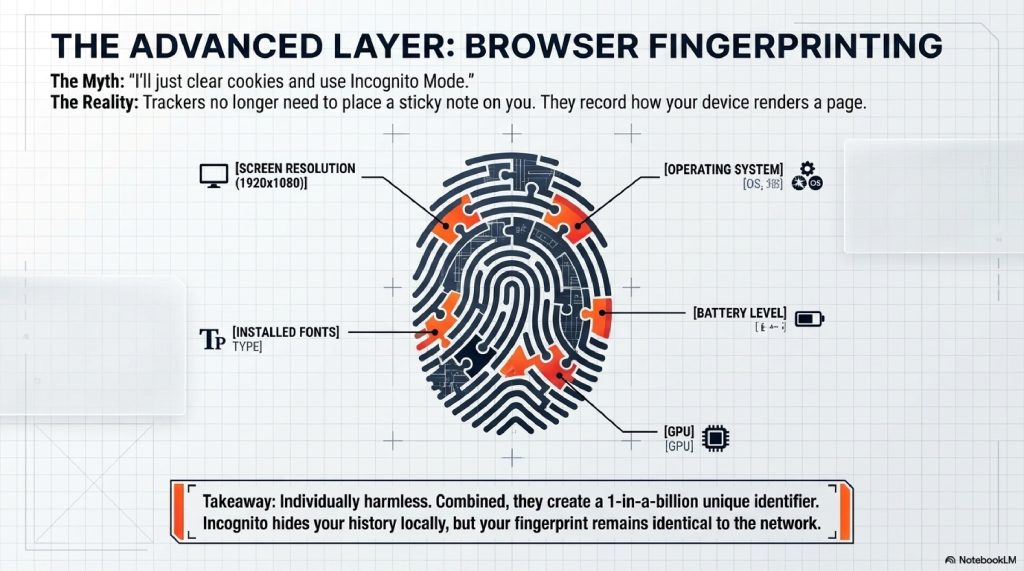
When you visit a website, your browser has to share certain information with the website to make sure the page displays correctly. It tells the website:
- Your exact screen resolution (e.g., 1920×1080)
- Your operating system (e.g., Windows 11)
- The exact specific fonts installed on your computer
- Your battery level
- Your time zone
- Your graphics card details
On their own, none of these data points reveal your name. But when you combine them all together, they form a highly unique combination.
Imagine police looking for a suspect. Knowing the suspect is “wearing a red shirt” isn’t helpful. But knowing the suspect is “wearing a red shirt, has a scar on their left cheek, speaks French, is 6’2″, and has a limp” narrows it down to exactly one person in the world.
That is Browser Fingerprinting. Even if you use Incognito Mode, the website looks at your unique hardware and software combination and says, “Oh, the cookies are gone, but this exact combination of fonts, screen size, and graphics card was here yesterday. It’s the same person.”
And just like that, the tracking resumes.
Real-Time Bidding (RTB): The Stock Market of You
We need to talk about the sheer scale of this system. It is called Real-Time Bidding (RTB).
RTB is a digital stock market, but instead of trading shares of Apple or Ford, it trades shares of human attention.

Every single day, tens of billions of automated auctions take place behind the scenes of the internet. Companies known as Data Brokers (like Acxiom or Experian) sweep up all your cookies, your location data from free weather apps, and your credit card purchase history. They package this data into hyper-specific audiences: “Expectant Mothers in Ohio,” or “Middle-aged men worried about hair loss.”
When you load a webpage, you are actively auctioned off to the highest bidder based on those invisible psychological profiles. You are the product being sold, and your screen is the delivery mechanism.
Common Myths About Internet Tracking
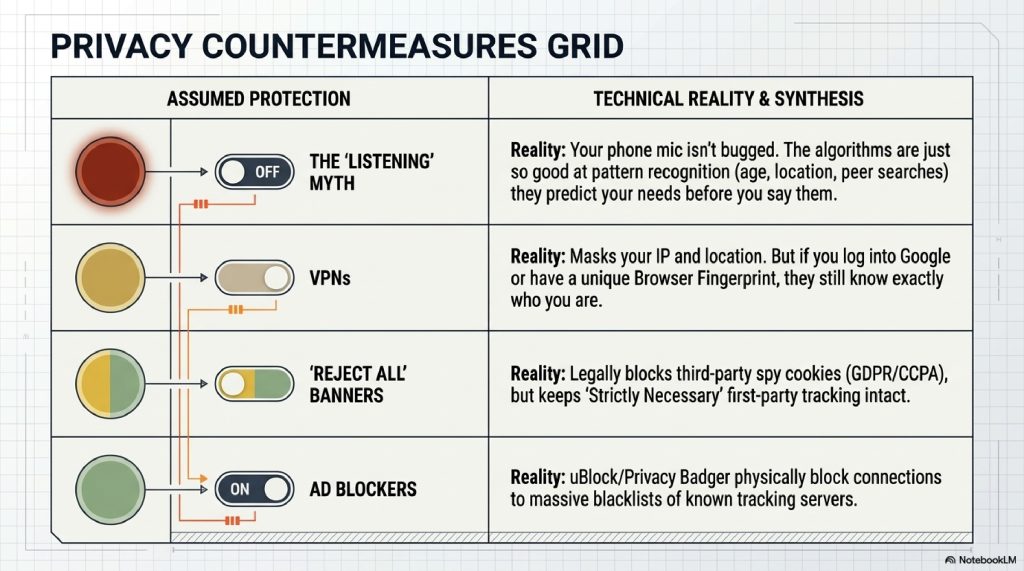
Myth 1: My phone is listening to my conversations. Reality: If you talk about buying a mattress and then see a mattress ad, it feels like your mic is bugged. But it’s not. The reality is much scarier: the tracking algorithms are so good at pattern recognition that they predicted you needed a mattress based on your age, recent location changes (did you just visit a real estate site?), and the search habits of people you spend time with. They don’t need to listen to you; their math is just that accurate.
Myth 2: Incognito / Private Browsing makes me invisible. Reality: Incognito Mode only hides your history from other people who use your computer. It does not hide you from your internet service provider, your employer, or the websites you visit.
Myth 3: VPNs stop all tracking. Reality: A Virtual Private Network (VPN) hides your IP address and encrypts your traffic. It is great for security. But if you log into your Google account while using a VPN, or if a site uses Browser Fingerprinting, they still know exactly who you are. A VPN masks your location, not your identity.
Fascinating Facts You Didn’t Know
- The Origin of “Cookie”: The term was coined in 1994 by a 24-year-old Netscape programmer named Lou Montulli. It comes from an old computing term “magic cookie,” which refers to a packet of data a program receives and sends back unchanged.
- The Weight of Tracking: On many major news websites, the actual news article accounts for only 20% of the data downloaded to your phone. The other 80% of the data consists of hidden tracking scripts and ads.
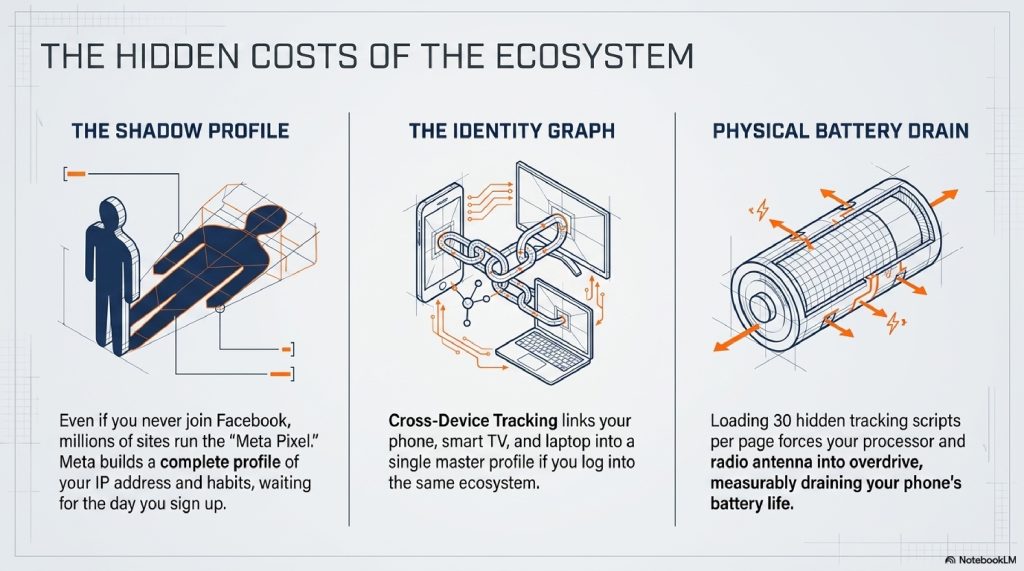
- The “Shadow Profile”: Even if you have never created a Facebook account, Meta likely has a “Shadow Profile” on you. Because millions of websites use the “Meta Pixel” to track visitors, Meta builds a profile of your habits based on your IP address, waiting for the day you finally sign up.
The Future: The Death of the Cookie & AI Tracking
The wild west of internet tracking is currently going through a massive earthquake.
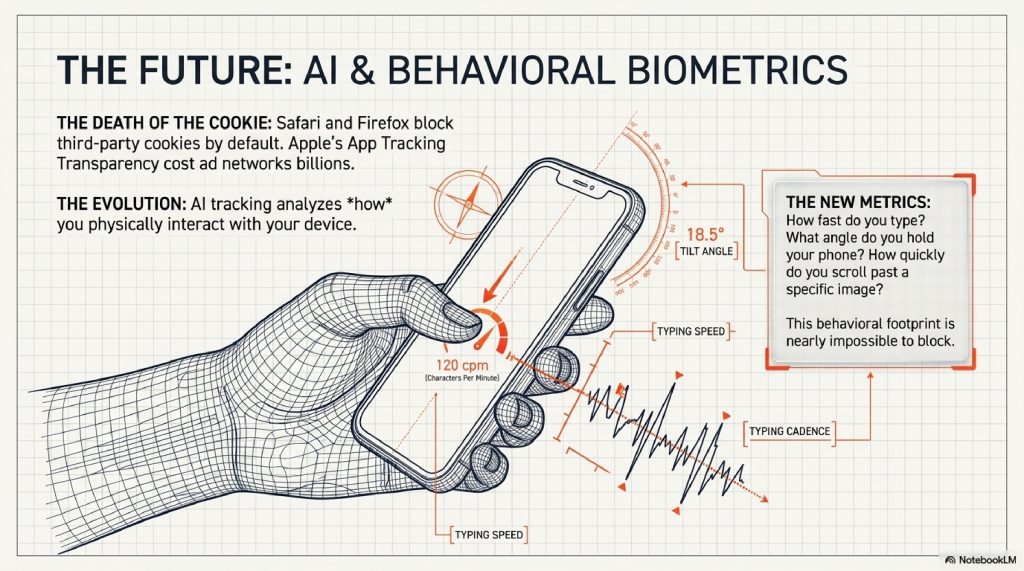
Browsers like Apple’s Safari and Mozilla’s Firefox have already blocked third-party cookies by default. Apple introduced “App Tracking Transparency” on iPhones, allowing users to ask apps not to track them (which cost companies like Meta billions of dollars in lost ad revenue).
Even Google Chrome is attempting to phase out third-party cookies in favor of a new system called the Privacy Sandbox. Instead of tracking you individually, the browser will group you into a “cohort” or “topic” of thousands of similar people, allowing advertisers to target the group rather than the individual.
However, the future is moving toward Artificial Intelligence. Instead of relying on clunky cookies, AI will analyze your behavioral biometrics. How fast do you type? What angle do you hold your phone? How quickly do you scroll past a specific image? AI will track how you interact with a device, creating a behavioral footprint that is nearly impossible to block or disguise.
FREQUENTLY ASKED QUESTIONS (FAQs)
1. Does clearing my cache and cookies actually do anything? Yes. It wipes out all the “sticky notes” currently on your browser, forcing trackers to start over. However, within an hour of browsing, a new batch of cookies will be reinstalled on your device.
2. Why do websites have those annoying “Accept Cookies” banners now? Those banners are required by data privacy laws, most notably the GDPR in Europe and the CCPA in California. They force websites to ask for your explicit consent before putting third-party trackers on your machine.
3. What happens if I click “Reject All”? The website is legally required to withhold third-party advertising and tracking cookies. However, they will still use “Strictly Necessary” first-party cookies to keep the website functioning (like remembering your shopping cart).
4. How do ad blockers work? Ad blockers and anti-tracking extensions (like uBlock Origin or Privacy Badger) maintain a massive blacklist of known tracking server URLs. When a webpage tries to load a script from one of those servers, the extension physically blocks the connection.
5. Can they track me across different devices? Yes, this is called “Cross-Device Tracking.” If you are logged into Google or Facebook on your phone, and also logged into them on your smart TV or laptop, companies link those devices together into an “Identity Graph.”
6. What is a “Data Broker”? Data brokers are companies that exist solely to collect, aggregate, and sell your personal information. They scrape public records, buy purchase histories from credit card companies, and merge them with your online browsing data to sell to advertisers.
7. Can tracking be used for things other than ads? Absolutely. Airlines have been accused of using cookies to see if you repeatedly check a specific flight route, raising the ticket price slightly because they know you are desperate to buy. (Though airlines officially deny this).
8. Does tracking drain my phone battery? Yes. Every time a web page loads 30 different tracking scripts, your phone’s processor has to work harder, and your radio antenna has to transmit more data, which noticeably drains your battery life.
9. What is Apple’s App Tracking Transparency? It is a feature introduced in iOS 14.5 that forces app developers to show a pop-up asking for permission to track your activity across other companies’ apps and websites. Most users click “Ask App Not to Track,” severely crippling the mobile data market.
10. Is internet tracking illegal? No, it is highly regulated but generally legal. The internet is mostly free to use (like Google, YouTube, and news sites) because these companies monetize your attention and data to pay for their servers.
OTHER USEFUL BLOG SUGGESTIONS
To continue exploring the hidden architecture of the internet, check out these related guides:
- How Neural Networks Learn: The Hidden Science of AI
- How Wi-Fi Actually Works: The Invisible Data Highway
CONCLUSION
The modern internet is a masterpiece of invisible engineering. Every time your thumb swipes across a screen, you are generating ripples in an ocean of data.
For decades, we viewed the internet as a window, a piece of glass we look through to see the world. But as tracking technology has evolved from simple text files to hyper-complex browser fingerprinting and real-time auctions, the internet has become something else entirely.
It is no longer just a window. It is a mirror.

The algorithms tracking you know what you are afraid of. They know what you are saving money for. They know when you are feeling lonely, and they know what color sneakers might offer a momentary hit of dopamine.
Understanding how websites track you isn’t just about protecting your privacy; it is about understanding the fundamental business model of the 21st century. The trackers aren’t going away, but by seeing the invisible strings, the cookies, the pixels, and the auctions, you can finally decide how much of yourself you are willing to give to the machine.
The next time those blue sneakers follow you onto a new website, you won’t just see an ad. You’ll see the invisible sticky note, the millisecond auction, and the incredible, hidden machinery of the web working exactly as it was designed to.
Comments (3)