Right now, as you read this sentence, you are sitting in a glass house.
In the physical world, we have walls, drawn curtains, and locked doors. But the digital world, the internet was built with transparency as its default setting. When you log onto a public Wi-Fi network at a local coffee shop to check your bank account, you are effectively shouting your personal information across a crowded room in a language anyone can learn.
Even in the privacy of your own home, your Internet Service Provider (ISP) acts as an omniscient digital postman. They log every website you visit, every file you download, and every late-night Google search you make. In many countries, they are legally permitted to package that data and sell it to the highest bidder. Your data is currency. Your location is a commodity. And your privacy is an illusion. Unless, of course, you pull the digital curtains.
Billions of people have downloaded a Virtual Private Network (VPN) app. They click a big, satisfying toggle button on their screen, the icon turns green, and they suddenly feel safe. But almost no one understands the staggering mathematical acrobatics happening behind that button.
How can a piece of software magically relocate your phone’s digital footprint from a café in London to a high-rise in Tokyo in less than a second? How does it mathematically scramble your passwords so thoroughly that even the world’s most advanced supercomputers couldn’t guess them in a billion years?
To understand how a VPN works is to understand a modern digital rebellion. It is a story of cold-war cryptography, subterranean internet cables, and the fundamental right to be invisible.
Let’s dismantle the illusion of the naked internet, and explore the invisible armor of the VPN.
TABLE OF CONTENTS
- The Naked Internet: Why You Need a VPN
- The Simple Explanation: The Postcard and the Armored Truck
- The Step-by-Step Journey of a Masked Click
- Real-World Example: The Airport Wi-Fi Trap
- Advanced Wizardry: Encryption and the “Paint Mixing” Math
- Under the Hood: WireGuard, OpenVPN, and Protocols
- Common Myths About VPNs (Debunked)
- The Future: Quantum Computers and Decentralized Networks
- Fascinating VPN Facts You Didn’t Know
- Frequently Asked Questions (FAQs)
The Naked Internet: Why You Need a VPN
To understand the cure, you must first understand the disease.
The internet is essentially a massive system of digital roads connecting computers together. Every device on this network, your phone, your smart TV, the server hosting this article is assigned an IP Address. Think of an IP address like a physical home address for your device (e.g., 192.168.1.5).
When you want to visit a website, your computer sends out a “Data Packet” (a digital envelope). On the outside of this envelope is written your IP address (the return address) and the website’s IP address (the destination).
Here is the terrifying part: By default, anyone handling that envelope can read both the addresses AND the contents inside.
Your Internet Service Provider (ISP) processes every single envelope. The hacker sitting on the same hotel Wi-Fi can intercept the envelopes as they fly through the air. You are fundamentally exposed.
The Simple Explanation: The Postcard and the Armored Truck
Think of the standard internet like sending a postcard through the mail.
You write a message on the back, put your home address in the corner, and write the recipient’s address in the center. As it travels from your local post office to regional sorting centers, any postal worker who touches it can just flip it over and read what you wrote. They also know exactly where you live.
A VPN transforms that postcard into a highly secure operation.
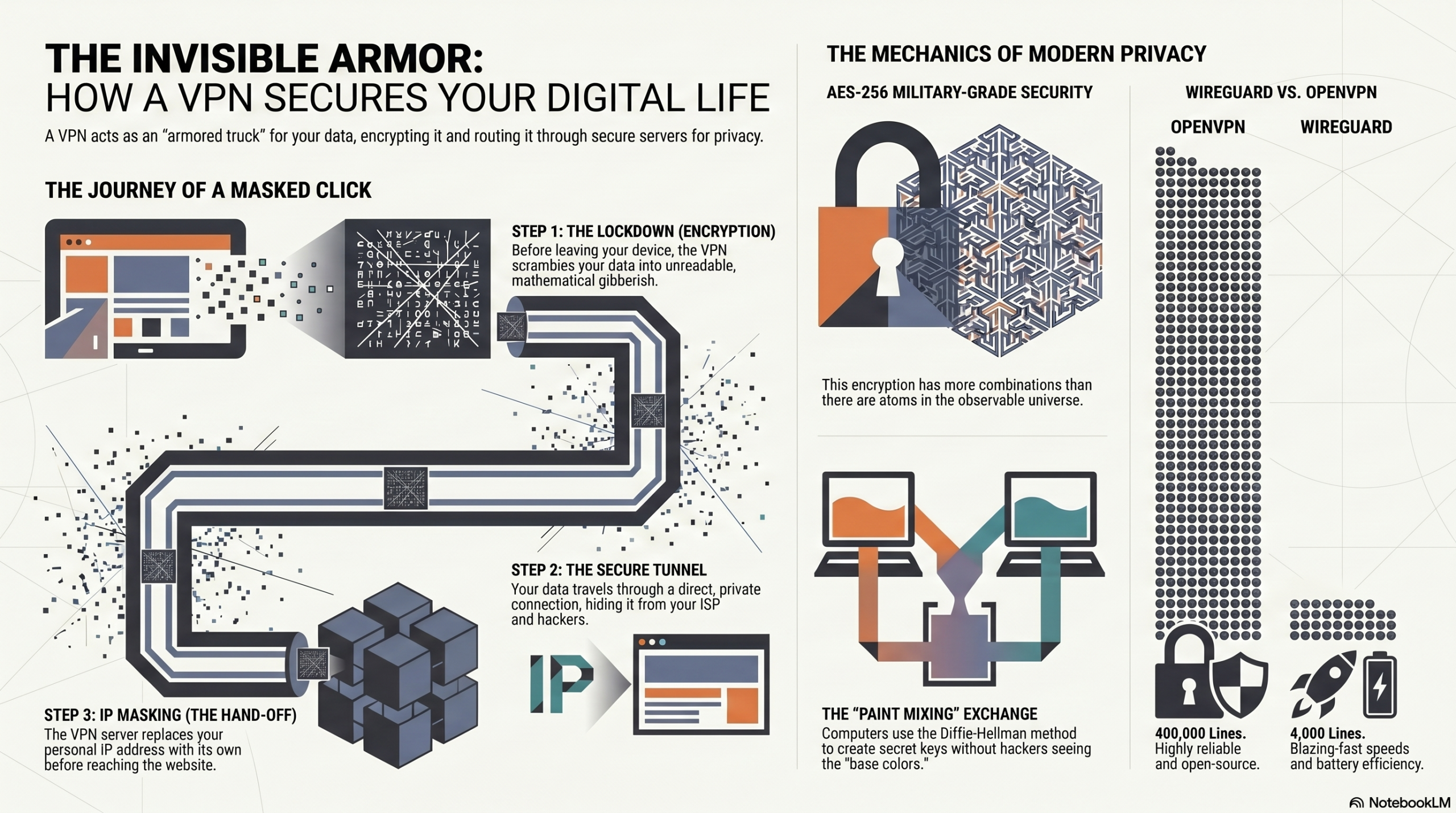
When you turn on a VPN, you take your message, write it in an unbreakable secret code, lock it inside a titanium safe, and put it in the back of an armored truck.
The armored truck drives to a secure, secret warehouse (the VPN Server). The workers at the warehouse open the safe, translate the secret code, and put the message inside a brand new envelope with the warehouse’s return address on it, not yours. They then send it to the final destination.
When the recipient (the website) gets the message, they have no idea who actually wrote it. They only know it came from the secret warehouse.
The Step-by-Step Journey of a Masked Click
Let’s slow down time and look at exactly what happens when you have a VPN turned on and you click a link to load a webpage.
- Step 1: The Lockdown (Encryption) – Before any data even leaves your phone or computer, the VPN software scrambles your data into unreadable gibberish. If your request was “Show me my bank balance”, it becomes something like “8x!qZ9p@L2vM#…”.
- Step 2: The Secure Tunnel – Your device establishes a direct, secure connection to the VPN server. This is the “tunnel.” Your device wraps the scrambled data in an outer layer that simply says, “Deliver to the VPN Server.”
- Step 3: The Blind ISP – Your data packet travels to your local Wi-Fi router, and then to your ISP. The ISP looks at the packet, but all they can see is the outer layer. They know you are talking to a VPN server, but they have zero idea what you are saying or where your data is ultimately going.
- Step 4: The VPN Server (The Middleman) – The packet arrives at the VPN server (which could be in Switzerland, Singapore, or just down the street). The server strips away the outer layer and uses a secret key to decrypt your gibberish back into “Show me my bank balance”.
- Step 5: The Hand-off (IP Masking) – The VPN server creates a new data packet for your bank. But crucially, it puts its own IP address as the return address. It sends the request to the bank.
- Step 6: The Return Trip – The bank sends your balance back to the VPN server. The server scrambles it again, shoots it back through the secure tunnel past your blind ISP, and back to your phone, where your VPN app decrypts it and displays it on your screen.
This entire global relay race happens in milliseconds.
Real-World Example: The Airport Wi-Fi Trap
Imagine you are waiting for a flight at JFK Airport. You connect to the free network called “JFK_Free_WiFi”.
What you don’t know is that a teenager three rows away has set up a fake network on his laptop with the exact same name. This is called a “Man-in-the-Middle” attack. Because you connected to his router, all your internet traffic is flowing physically through his laptop before hitting the actual internet.
Without a VPN: You type your password into a website. It flies through the air in plain text. The teenager captures it instantly.
With a VPN: You type your password. Before it leaves your phone’s antenna, it is encrypted. It flies through the air to the teenager’s laptop. He captures it, but when he opens the file, it’s just a massive wall of randomized characters. Without the mathematical decryption key, it is entirely useless to him. You sip your coffee, completely safe.
Advanced Wizardry: Encryption and the “Paint Mixing” Math
Wait… if the hacker intercepts everything, how do my phone and the VPN server agree on a secret code in the first place? Wouldn’t the hacker just intercept the code when we share it?
This is the most brilliant part of a VPN. It uses a mathematical concept called the Diffie-Hellman Key Exchange. Let’s explain this with a famous analogy: Paint mixing.
Imagine you and the VPN server want to agree on a secret paint color, but a hacker is watching everything you do.
- You and the server publicly agree to start with a common color, say, Yellow. The hacker sees Yellow.
- You secretly pick a personal color (Red) and mix it with Yellow to make Orange. You send Orange to the server. The hacker intercepts Orange, but it’s really hard to un-mix paint to find out your secret color was Red.
- The server secretly picks a personal color (Blue) and mixes it with Yellow to make Green. It sends Green to you. The hacker intercepts Green.
- Now, the magic step. You take your secret Red and mix it with the server’s Green. The result is a muddy Brown.
- The server takes its secret Blue and mixes it with your Orange. The result is the exact same muddy Brown.
You and the server now share a secret color (Brown) that you can use to lock your data. The hacker only has Yellow, Orange, and Green. They can never recreate the Brown without knowing the secret base colors.
AES-256: Military-Grade Security
Once the secret key is established, VPNs use AES-256 (Advanced Encryption Standard). To understand how secure this is, “256” means the secret key is a string of 256 ones and zeros. That means there are $2^{256}$ possible combinations.
That number is larger than the estimated number of atoms in the observable universe. If you took all the supercomputers on Earth and ran them for billions of years, they still wouldn’t be able to crack an AES-256 key by guessing.
Under the Hood: WireGuard, OpenVPN, and Protocols
A VPN “Protocol” is the set of rules that dictates exactly how the secure tunnel is built. Think of them as different types of vehicles carrying your data.
- OpenVPN: The reliable old armored truck. It has been around for decades, is open-source (meaning thousands of security experts have inspected its code), and is highly secure. However, it requires a lot of code, making it slightly slower and heavier on your device’s battery.
- WireGuard: The modern stealth fighter. This is the newest standard. While OpenVPN uses around 400,000 lines of code, WireGuard uses only 4,000. Because it is so streamlined, it connects almost instantly, uses less battery, and offers blazing-fast speeds without sacrificing security. Most premium VPNs now default to WireGuard.
Common Myths About VPNs (Debunked)
Myth 1: “A VPN makes me 100% anonymous online.”
Reality: A VPN gives you privacy, not total anonymity. If you log into your personal Facebook account while connected to a VPN, Facebook still knows exactly who you are based on your login credentials, cookies, and browser fingerprinting.
Myth 2: “Free VPNs are just as good as paid ones.”
Reality: Running thousands of global servers costs millions of dollars. If you aren’t paying for the product, you are the product. Many free VPNs actually log your data and sell it to advertisers, completely defeating the purpose of a VPN. Others inject ads or use weak, outdated encryption.
Myth 3: “A VPN speeds up your internet.”
Reality: Because a VPN encrypts your data and routes it through an extra server, it typically slows down your internet slightly. The only exception is if your ISP is artificially throttling your speed for activities like gaming or torrenting; a VPN can hide this activity, bypassing the throttle.
The Future: Quantum Computers and Decentralized Networks
The cybersecurity war never stops. What happens to VPNs in the next decade?
The Quantum Threat
Remember how we said it would take a billion years for a supercomputer to crack AES-256 encryption? Quantum computers operate on entirely different laws of physics. In theory, a powerful enough quantum computer could shatter today’s encryption in minutes. In response, VPN companies are currently racing to develop and implement Post-Quantum Cryptography, new mathematical algorithms designed to withstand attacks from quantum machines before they become a reality.
Decentralized VPNs (dVPNs)
Currently, you have to trust the VPN company. What if their servers are seized by a government? The future might be dVPNs, built on blockchain technology. Instead of routing your traffic through a corporate server, your traffic is routed through a decentralized network of millions of other users’ personal devices. There is no central server to hack, seize, or monitor.
Fascinating VPN Facts You Didn’t Know
- The First VPN: The concept of a VPN (specifically PPTP, Point-to-Point Tunneling Protocol) was invented in 1996 by an employee at Microsoft to allow remote workers a secure way to access the company’s internal network.
- The Great Firewall: China employs advanced technology called “Deep Packet Inspection.” It doesn’t just look at where a packet is going; it analyzes the shape of the encrypted data. If it looks like VPN traffic, the government blocks it. Premium VPNs combat this by using “Obfuscation” servers that disguise VPN traffic to look like regular HTTPS web browsing.
- Streaming Wars: Over 30% of VPN users primarily use the technology just to access geo-blocked entertainment. By connecting to a server in Japan, Netflix thinks they are in Tokyo, unlocking a completely different catalog of anime and movies.
FREQUENTLY ASKED QUESTIONS (FAQS)
1. Is it legal to use a VPN?
In the vast majority of countries (including the US, UK, Canada, and most of Europe), using a VPN is 100% legal. However, doing illegal things while connected to a VPN is still illegal. A few countries (like North Korea, Belarus, and Iraq) ban them entirely.
2. What does “No-Logs Policy” mean?
A strict no-logs policy means the VPN company essentially operates with amnesia. They do not record your IP address, the websites you visit, or the files you download. Even if law enforcement demands their records, the company mathematically has nothing to hand over.
3. Does a VPN drain my phone battery?
Yes, slightly. Because your device’s processor is constantly working in the background to encrypt and decrypt data in real-time, it will consume more battery power than a standard internet connection.
4. Can my internet provider see I’m using a VPN?
Yes. Your ISP can see that you are connected to a known VPN server IP address, and they can see encrypted data packets flowing back and forth. They just cannot see what the data is or where it ultimately goes after the VPN server.
5. Should I leave my VPN on all the time?
If privacy is your top priority, yes. Leaving it on ensures all background apps and updates are secured. However, you might want to turn it off for online activities that require maximum speed and low latency, like competitive gaming.
6. Does a VPN protect me from viruses or malware?
Not inherently. A VPN hides your data in transit, but if you voluntarily download a malicious file or click a phishing link, the VPN will happily encrypt that virus and deliver it safely to your computer. You still need antivirus software.
7. Can I use a VPN on my smart TV?
Yes. You can usually download a VPN app directly onto modern smart TVs (like Android TV or Fire TV). Alternatively, you can install a VPN directly onto your home router, which automatically protects every device in your house, including smart fridges and gaming consoles.
8. What is a “Kill Switch”?
A kill switch is a crucial security feature. If your connection to the VPN server drops unexpectedly (even for a split second), the kill switch instantly cuts off your device’s internet access, preventing your real IP address from leaking to the open web.
9. Why do websites block VPNs?
Streaming services (like Netflix or Hulu) block VPN IP addresses to enforce regional copyright licensing agreements. Banks occasionally block them because a sudden login from a foreign country triggers fraud alerts.
10. What’s the difference between a VPN and an Incognito mode?
Incognito (or private browsing) mode only hides your local history. It stops your browser from saving cookies and search history on your device. It does absolutely nothing to hide your traffic from your ISP, the government, or the websites you visit. A VPN actually hides your traffic from the outside world.
To deepen your understanding of digital security, check out our related guides:
- https://insidethesystem.online/how-satellite-internet-works-space-technology/
- https://insidethesystem.online/how-wifi-works-wireless-technology-explained/
CONCLUSION
The internet was an incredible invention, but it was fundamentally flawed from the start. It was designed for academics and scientists to share data openly, not for billions of people to conduct banking, share intimate messages, and live their private lives.
Using the internet without protection is like walking through a bustling city with your entire life history, your wallet contents, and your home address printed on your t-shirt. A Virtual Private Network provides the jacket.
Behind that simple green toggle switch on your screen lies a beautiful, invisible world of mathematical chaos. Millions of lines of code working in perfect harmony to scramble your identity, tunnel beneath the watchful eyes of corporations, and bounce your signal across oceans in the blink of an eye.
In a world where data is the most valuable resource on the planet, invisibility is a superpower. Turn on your VPN, lock your data in the armored truck, and take back your digital privacy.