You pull two tiny white pieces of plastic from a case and place them in your ears. You tap a glowing blue icon on the glass screen of your phone. Suddenly, a symphony orchestra, a true-crime podcast, or the voice of a friend thousands of miles away begins playing inside your head.
There are no wires. There is no physical connection. There is just empty air.
But if you could put on a pair of “radio-vision” goggles, you would see that the air in your room is anything but empty. It is a chaotic, screaming warzone of invisible energy. Wi-Fi routers are blasting heavy streams of data. Microwaves are humming with intense radiation. Baby monitors and smart lightbulbs are chattering back and forth.
Yet, amidst this deafening digital noise, your phone and your earbuds manage to hold a perfect, uninterrupted, private conversation.
We use Bluetooth every single day. We use it to connect our keyboards, track our lost keys, link our smartwatches, and play music in our cars. We tap “Pair,” the device connects, and we go about our lives. But behind that simple “Connected” notification is a staggering feat of modern physics and cryptography. It is a system that changes its behavior thousands of times per second, relies on World War II torpedo technology, and is named after a tenth-century Viking king with a dead tooth.
How does a microscopic chip in your wireless mouse broadcast a signal strong enough to reach your laptop, but weak enough to not drain an AA battery for a whole year? How do millions of devices share the exact same airspace without crashing into each other?
To understand Bluetooth is to understand one of the most elegant engineering solutions in human history. Let’s peel back the invisible layers of the air and discover how your devices are secretly talking to each other.
TABLE OF CONTENTS
- The Big Picture: Wires Made of Radio Waves
- The Simple Explanation: The Crowded Cocktail Party
- The Step-by-Step Journey of a Bluetooth Connection
- The 2.4 GHz Warzone: Surviving the Noise
- Advanced Wizardry: Frequency Hopping and Hedy Lamarr
- The Network Architecture: Masters, Slaves, and Piconets
- Bluetooth Classic vs. Bluetooth Low Energy (BLE)
- Why Does My Audio Lag? A Look at Codecs
- Common Myths About Bluetooth (Debunked)
- The Future: Auracast and Beyond
- Fascinating Facts: Vikings and Bind Runes
- Frequently Asked Questions (FAQs)
The Big Picture: Wires Made of Radio Waves
At its absolute core, Bluetooth is just radio.
If you understand how a local FM radio station works, you understand the foundational physics of Bluetooth. An electrical signal (your data) is converted into an electromagnetic wave, broadcasted through the air via an antenna, and caught by another antenna which turns it back into electricity.
But standard radio is a one-way street. A radio tower screams music into the void, and your car stereo listens. You can’t talk back. Furthermore, radio stations require massive towers and millions of watts of power to push those waves across a city.
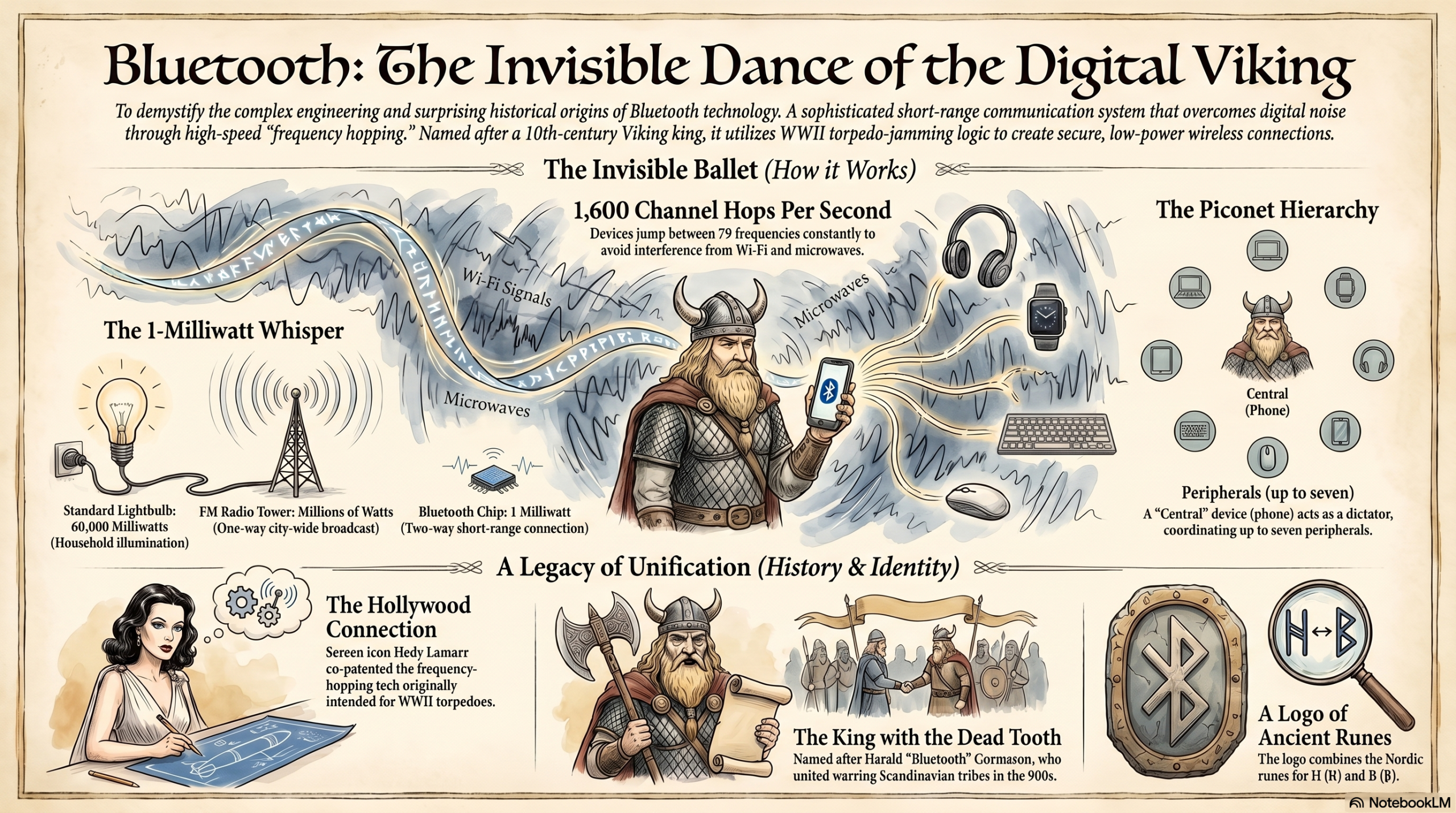
Bluetooth was designed to do the exact opposite. It is a two-way (full-duplex) communication system designed for extreme short-range connectivity (usually about 30 feet). Instead of using massive towers, it uses microscopic antennas that broadcast incredibly weak signals typically just 1 milliwatt of power (a standard lightbulb uses 60,000 milliwatts!).
This weak signal is intentional. It ensures that your phone’s Bluetooth doesn’t accidentally connect to a speaker three houses down the street.
The Simple Explanation: The Crowded Cocktail Party
Imagine you are at a massive, incredibly loud cocktail party. Hundreds of people are shouting to each other at the exact same time.
You want to tell a secret to your friend standing a few feet away. If you just shout the secret in English, everyone else talking in English will interfere with your voice, and your friend won’t hear you. Worse, someone else might overhear your secret.
So, you and your friend come up with a brilliant strategy.
Before you start talking, you synchronize your watches. You agree to speak a different language every fraction of a second.
- For 1/10th of a second, you speak in Spanish.
- The next 1/10th of a second, you switch to French.
- Then Japanese.
- Then German.
To everyone else at the party, your conversation sounds like bursts of incomprehensible static. But to your friend, who knows exactly which language to expect at exactly what millisecond, your voice comes through perfectly clear. If the “French” channel is suddenly too loud because someone next to you is shouting in French, it doesn’t matter, because a split-second later, you are both already speaking Japanese.
This is exactly how Bluetooth works. It is an invisible, high-speed, synchronized dance.
The Step-by-Step Journey of a Bluetooth Connection
What exactly happens when you take your wireless earbuds out of their case and connect them to your phone? It happens in milliseconds, but it involves a complex digital handshake.
Step 1: The Inquiry (Who is out there?) When you put a device in “Pairing Mode,” it begins frantically shouting into the void: “Hello! I am a pair of Sony Headphones! My MAC address is 00:1A:7D:DA:71:13! Is anyone looking for me?” It repeats this shout across multiple radio frequencies.
Step 2: The Page (I hear you, let’s talk) Your phone (which has Bluetooth turned on) is actively listening for these shouts. When it hears the headphones, the phone sends a direct message back: “I hear you, Sony Headphones. I am an iPhone. Let’s establish a connection.”
Step 3: The Handshake (Security Check) The two devices now introduce themselves securely. They exchange security keys (a complex mathematical code) to ensure that their conversation is encrypted. This is why a hacker sitting on the bus next to you can’t intercept the audio of your phone call.
Step 4: The Frequency Dance (The Piconet) Once they agree they trust each other, the phone takes charge. It acts as the “Central” device and tells the headphones (the “Peripheral” device): “Okay, we are going to start hopping channels. We will start on channel 12, then jump to channel 45, then channel 3. Follow my lead.”
The music starts playing.
The 2.4 GHz Warzone: Surviving the Noise
Here is the biggest problem Bluetooth engineers faced: they had to put it in the 2.4 GHz ISM Band.
The global radio spectrum is strictly regulated by governments. You can’t just broadcast on any frequency you want, or you might accidentally interfere with airplane radar, police scanners, or military communications. However, there is a specific band of frequencies around 2.4 Gigahertz reserved internationally for Industrial, Scientific, and Medical (ISM) use. It’s essentially the “public park” of the radio spectrum. Anyone can use it for free without a license.
Because it’s free, everything uses it. Your Wi-Fi router, cordless phones, baby monitors, wireless security cameras, and even your microwave oven operate on or leak radiation into the 2.4 GHz band.
If Bluetooth just sat on a single 2.4 GHz frequency, a microwave turning on would instantly obliterate your audio connection.
Advanced Wizardry: Frequency Hopping and Hedy Lamarr
To survive the 2.4 GHz warzone, Bluetooth relies on a technology called Frequency-Hopping Spread Spectrum (FHSS).
Bluetooth divides the 2.4 GHz band into 79 individual channels (like 79 different radio stations). When your phone and earbuds connect, they don’t stay on one channel. They bounce around between these 79 channels at a mind-boggling speed of 1,600 times per second.
If your Wi-Fi is heavily clogging up Channel 14, and your microwave is blasting noise on Channel 50, it doesn’t matter. Your Bluetooth connection only spends 625 microseconds on a bad channel before instantly jumping to a clear one. If a tiny packet of audio data is lost on a crowded channel, the system just resends it on the next clear hop. It happens so fast your human brain perceives it as a continuous, flawless stream of music.
Wait… who invented this? The foundational concept of frequency hopping wasn’t invented by a modern tech billionaire. It was co-patented during World War II by avant-garde composer George Antheil and Hollywood golden-age actress Hedy Lamarr. They designed a system to make Allied torpedoes immune to Nazi radio jamming by having the torpedo and the ship rapidly hop frequencies in unison, controlled by synchronized piano rolls. Today, that exact concept powers your AirPods.
The Network Architecture: Piconets
Bluetooth doesn’t just connect two devices. It creates miniature, invisible networks called Piconets.
In a standard Piconet, there is one Central device (usually your phone or laptop) and up to seven active Peripheral devices (your mouse, keyboard, headphones, smartwatch).
The Central device is the absolute dictator of the Piconet. It keeps the master clock. It tells every peripheral exactly when to hop to the next frequency and when they are allowed to speak. If your smartwatch wants to send a heart-rate update to your phone, it has to wait for the phone to give it a specific microsecond time-slot to transmit. This military-level coordination ensures your mouse clicks don’t interfere with your music stream.
Bluetooth Classic vs. Bluetooth Low Energy (BLE)
If you left the Bluetooth on your early-2000s flip phone active, your battery would be dead by lunch. Today, you leave Bluetooth on 24/7 without noticing. What changed?
In 2010, the Bluetooth Special Interest Group (SIG) released Bluetooth Low Energy (BLE).
- Bluetooth Classic is used for heavy, continuous streams of data. When you are listening to an hour-long podcast, you need Classic. It keeps a constant, open pipe of data flowing.
- Bluetooth Low Energy (BLE) is designed for devices that only need to send tiny bursts of data occasionally. Your fitness tracker doesn’t need a constant stream; it just needs to wake up, shout “Hey, he took 10 steps,” and immediately go back to sleep.
BLE devices spend 99% of their life in a deep sleep state. Because of this, a BLE tracking tag (like an Apple AirTag) can run continuously on a tiny coin-cell battery for over a year.
Why Does My Audio Lag? A Look at Codecs
Have you ever watched a YouTube video with Bluetooth headphones, and the person’s lips don’t match the audio? This is a latency problem caused by Codecs.
A standard audio file is too “fat” to fit through the narrow radio waves of Bluetooth. Before your phone can send the audio, it has to smash it down into a smaller size. A “Codec” (Coder-Decoder) is the software algorithm that compresses the audio on your phone, and decompresses it inside your headphones.
- SBC (Subband Coding): The default codec every Bluetooth device must support. It works, but it aggressively compresses the audio, losing some quality, and has high latency.
- AAC (Advanced Audio Coding): Apple’s preferred codec. Extremely efficient and sounds great on iPhones.
- aptX and LDAC: High-end codecs used heavily in Android devices. They allow much “fatter” packets of data to pass through, delivering near-CD quality (Hi-Res) audio with almost zero lag.
The compression, transmission, and decompression process takes time usually about 150 to 200 milliseconds. If the codec is slow, you get lip-sync issues.
Common Myths About Bluetooth (Debunked)
Myth 1: “Leaving Bluetooth on drains my phone’s battery rapidly.” Reality: This was true 15 years ago. Today, thanks to Bluetooth Low Energy (BLE), having your phone’s Bluetooth on but not actively streaming audio consumes less than 1% of your battery over a 24-hour period.
Myth 2: “Bluetooth audio is terrible compared to wired headphones.” Reality: While purist audiophiles will always prefer wires, modern Bluetooth codecs like LDAC and aptX HD transmit bitrates so high that the average human ear cannot distinguish them from a wired connection on standard streaming services like Spotify.
Myth 3: “Bluetooth is easy for hackers to intercept.” Reality: Modern Bluetooth connections use military-grade 128-bit AES encryption. A hacker sitting next to you cannot “tune in” to your phone call. The only real vulnerability is if a user accidentally pairs their device to a malicious terminal masquerading as a public device.
The Future: Auracast and Beyond
What is the next frontier for Bluetooth? A technology called Auracast.
Historically, Bluetooth has been a 1-to-1 connection. One phone connects to one pair of headphones. Auracast changes this entirely. It turns Bluetooth into a 1-to-many broadcast system.
Imagine walking into a sports bar with 10 silent TVs on the wall. With Auracast, you pull out your phone, select “TV 4,” and the audio beams directly into your earbuds. Imagine being at an airport gate, and instead of straining to hear the muffled loudspeaker, the boarding announcements are broadcast directly into your hearing aids or headphones. Auracast will turn public spaces into customizable, personal audio environments.
Fascinating Facts: Vikings and Bind Runes
Why is a cutting-edge wireless technology named after a medieval Viking?
In 1996, engineers from Intel, Ericsson, and Nokia met in a bar in Sweden to standardize a new short-range radio technology. They needed a temporary code name for the project.
Intel engineer Jim Kardach had recently been reading a book about Vikings. He suggested the name “Bluetooth,” after King Harald “Bluetooth” Gormsson, a 10th-century king famous for uniting the disparate, warring tribes of Denmark and Norway. Kardach reasoned that their new technology was designed to unite disparate communication protocols (PC and Cellular) into one universal standard.
The name was only supposed to be a placeholder until the marketing department came up with something better (they originally wanted “RadioWire”). But the trademark process was delayed, and “Bluetooth” stuck.
Look closely at the famous blue Bluetooth logo. It is not a geometric “B”. It is a Bind Rune, a combination of the ancient Scandinavian runes for King Harald’s initials: Hagall (ᚼ) and Bjarkan (ᛒ).
FREQUENTLY ASKED QUESTIONS (FAQS)
1. What is the difference between Bluetooth and Wi-Fi? Wi-Fi is designed for high-bandwidth, long-range networks (connecting to the internet and downloading large files). Bluetooth is designed for low-bandwidth, extreme short-range connections between two localized devices (like a mouse to a PC).
2. Can Bluetooth work without Wi-Fi or cellular data? Yes. Bluetooth is an entirely independent radio frequency. You can be in the middle of the Sahara Desert with absolutely zero internet or cell service, and your phone will still perfectly connect to your wireless speaker.
3. What is the maximum range of Bluetooth? It depends on the “Class” of the device. Most consumer headphones are Class 2, which have a range of about 10 meters (33 feet). Class 1 industrial devices can reach up to 100 meters (328 feet) in open space.
4. Why does my Bluetooth connection drop when I walk into another room? Radio waves in the 2.4 GHz band struggle to pass through dense objects. Brick walls, metal appliances, and even water (including the water in human bodies) absorb the signal, severely reducing its range.
5. How many devices can I connect to my phone at once? A central device (your phone) can technically support up to 7 active peripheral connections at once in a Piconet. You can have your smartwatch, wireless earbuds, and a stylus all connected simultaneously without issue.
6. Is Bluetooth radiation dangerous? No. Bluetooth devices emit non-ionizing radiation at incredibly low power levels (usually less than 1 milliwatt). It does not have enough energy to damage human DNA or cells. It is completely safe to wear Bluetooth earbuds all day.
7. Why does my car’s Bluetooth take so long to connect? Cars often use older Bluetooth profiles and have complex infotainment operating systems that take time to boot up and negotiate the “Handshake” and security protocols with your phone.
8. What is Multipoint Bluetooth? Multipoint is a feature that allows a pair of headphones to connect to two source devices (like a laptop and a phone) simultaneously. If you are watching a movie on your laptop and a call comes in on your phone, the headphones will automatically switch audio feeds.
9. Can I upgrade my device’s Bluetooth version? Generally, no. The Bluetooth version (e.g., Bluetooth 4.0 vs 5.3) is tied to the physical hardware chip inside the device. While firmware updates can fix bugs, you cannot download software to turn a Bluetooth 4.0 chip into a 5.0 chip.
10. What does the “Smart” in Bluetooth Smart mean? “Bluetooth Smart” was an old marketing term used around 2011 to describe devices that utilized Bluetooth Low Energy (BLE). The industry has mostly abandoned the term, simply referring to it now as Bluetooth LE.
INTERNAL LINKING SUGGESTIONS
To keep readers exploring the invisible world of technology, consider linking these related topics:
- How Do Mobile Towers Work? The Science of Cellular Networks
- How Do VPNs Work? The Complete Guide to Virtual Private Networks
- How Does Satellite Internet Work? (A Complete Guide)
11. CONCLUSION
The next time you press play on your phone and the music instantly fills your wireless headphones, take a moment to appreciate the sheer mechanical poetry of what is happening.
Your devices are frantically screaming into a void filled with the noise of a thousand other machines. They are synchronizing their internal clocks, mathematically scrambling their secrets, and perfectly executing a choreographed dance across 79 different invisible radio channels 1,600 times every single second.
Bluetooth is the ultimate testament to human ingenuity. We took the violent, chaotic spectrum of electromagnetic radiation, applied the anti-torpedo logic of a Hollywood actress, wrapped it in the legacy of a Viking king, and used it to remove the tangled wires from our pockets.
It is a technology born of war, refined by mathematics, and dedicated entirely to the seamless convenience of modern life. It proves that sometimes, the most complex magic in the world is the kind we never even have to think about.